

“Where are you?” “Who’s closest to the client on Elm Street?” If your day is a constant stream of these questions, you know the frustration of managing a mobile team. It’s a guessing game that wastes time and kills efficiency. You need a clear, live view of your crew, but complex fleet software is too expensive and clunky. What you really need is a simple, effective team location tracker for work that gets the job done without the headache.
And that’s exactly what this guide is about. Forget endless phone tag and inefficient dispatching. It’s time for a solution that is fast, easy, and built for teams on the move, giving you instant visibility on one simple map. Real-time coordination couldn’t be easier than this.
In this article, you’ll learn how to implement real-time tracking to boost efficiency and improve safety. We’ll show you how to slash response times, make smarter job assignments, and increase accountability for your field staff-all with an affordable, user-friendly tool. Let’s get your team in sync.
Key Takeaways
- Boost your team’s productivity and safety by replacing outdated manual check-ins with instant, real-time location data.
- Identify the essential tracking features your team actually needs, helping you choose the right tool without paying for complex functions.
- Discover how to introduce a team location tracker for work transparently to gain employee trust and ensure a smooth rollout.
- Learn why simple, fast apps often outperform bloated fleet management systems for agile mobile team coordination.
Why Use a Team Location Tracker? Key Business Benefits
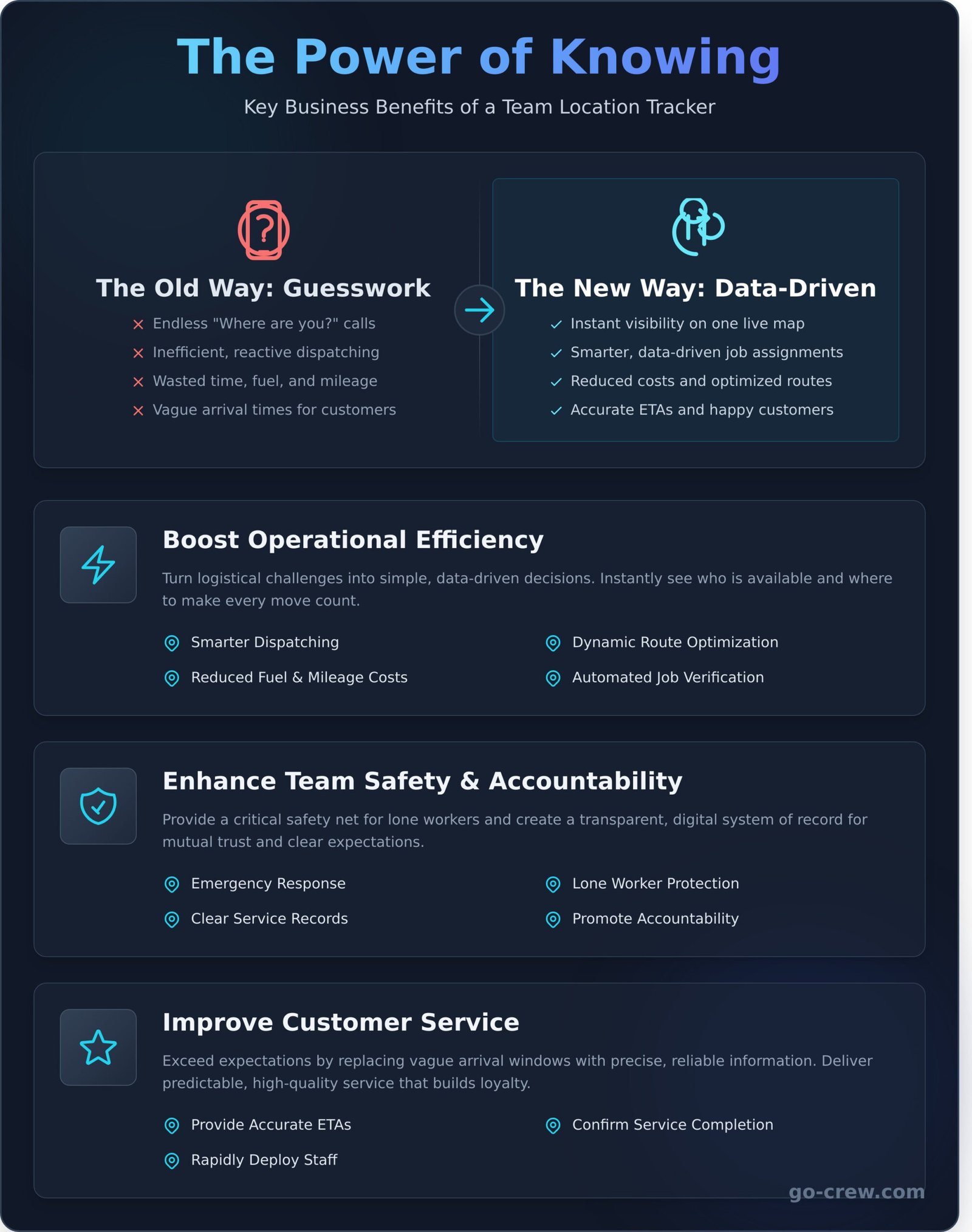
Managing a mobile team used to mean endless check-in calls, manual updates, and a lot of guesswork. Not anymore. A modern team location tracker for work moves you beyond that outdated model, transforming daily operations from reactive to proactive. It’s not just about seeing dots on a map; it’s about unlocking real-time data to drive significant gains in efficiency, safety, and customer satisfaction. This is how you calculate the true ROI of knowing where your team is, every minute of the day.
To see how these tools work in practice, check out this quick overview:
Boost Operational Efficiency
Forget the back-and-forth communication. Real-time location data puts you in the driver’s seat, turning logistical challenges into simple, data-driven decisions. Instantly see who is available and where, making every move count.
- Smarter Dispatching: Send the closest team member to a new job instantly, reducing response times.
- Dynamic Route Optimization: Adjust routes on-the-fly based on real-time traffic and team locations to avoid delays.
- Reduced Costs: Cut down on fuel consumption and unnecessary mileage by ensuring the most efficient travel paths.
- Automated Verification: Automatically log job site arrivals and departures without needing a single phone call.
Enhance Team Safety and Accountability
Your team’s well-being is paramount. A location tracker provides a critical safety net, especially for lone workers or those in remote environments. It also creates a transparent system of record, a core component of modern employee monitoring when implemented ethically. This isn’t about micromanagement; it’s about mutual trust and clear expectations.
- Emergency Response: Quickly locate a team member’s last known position in case of an emergency or accident.
- Lone Worker Protection: Ensure lone workers are safe, on schedule, and can be easily found if they become unresponsive.
- Clear Service Records: Create a digital, time-stamped log of every site visit for accurate billing and dispute resolution.
- Promote Accountability: Foster a culture of responsibility for schedules, job duration, and timely completion.
Improve Customer Service
Happy customers are the lifeblood of your business. A team location tracker for work is your key to exceeding expectations by replacing vague arrival windows with precise, reliable information. Deliver the predictable, high-quality service that builds loyalty.
- Provide Accurate ETAs: Give customers a real-time, Uber-like view of their technician’s arrival time.
- Confirm Service Completion: Verify that a job was completed with location-stamped data, giving clients peace of mind.
- Rapidly Deploy Staff: Respond to urgent customer requests faster by dispatching the nearest available employee.
Types of Location Trackers: From Simple Apps to Full Systems
Not all location tracking solutions are created equal. The market is filled with everything from lightweight apps to industrial-grade systems, and the key is finding the perfect fit for your team. Choosing the right team location tracker for work means you get the visibility you need without paying for complex features you’ll never use. It also means understanding the responsibilities that come with data collection, a critical topic for any manager looking into Securing Employees’ Location Data Privacy.
Let’s break down the main categories to help you make a smart, cost-effective choice.
Simple Location Sharing Apps (Like Go Crew)
These tools are built for one core purpose: real-time visibility and seamless group coordination. Instead of requiring extra hardware, they leverage the smartphones your team already carries. The focus is on simplicity and speed, giving you a live map view with essential data like current location, speed, and heading. This approach is ideal for small to medium-sized, agile teams that need to stay in sync on the go.
- Best for: Event staff, delivery services, sales teams, and any group needing fast, real-time coordination.
- Key benefit: Easy setup and immediate deployment with no hardware costs.
Time Tracking Apps with GPS Features
Here, the primary function isn’t live tracking but time management for payroll. GPS is used as a verification tool to confirm an employee’s location when they clock in or out. Many of these apps include geofencing, which can automatically log hours when a team member enters or leaves a designated job site. They provide proof of presence rather than a continuous view of movement throughout the day.
- Best for: Construction crews, field service technicians, and companies with hourly remote workers.
- Key benefit: Streamlines payroll and ensures accurate time-logging.
Comprehensive Fleet Management Systems
This is the heavy-duty option for businesses where vehicles are critical assets. These systems require dedicated hardware to be professionally installed in each vehicle. In return, they provide a wealth of data far beyond simple location, including engine diagnostics, fuel consumption, driver behavior reports (like harsh braking), and maintenance scheduling. This is the ultimate team location tracker for work when vehicle performance and compliance are top priorities.
- Best for: Large logistics companies, long-haul trucking, and businesses with extensive vehicle fleets.
- Key benefit: Deep operational insights that reduce costs and improve safety.
Essential Features for a Work Team Location Tracker
When choosing a team location tracker for work, more features don’t always mean better results. A cluttered, complex app slows everyone down. The goal is efficiency, which comes from a tool that is simple, accurate, and easy for your entire crew to adopt. Focusing on core functionalities ensures you get a tool that aids coordination, not one that creates friction. This approach helps avoid the common pitfalls of employee monitoring, where overly complex systems can feel intrusive-a concern often raised in the field of people analytics. Prioritize tools that empower your team, not just track them.
Here are the non-negotiable features that deliver real value without the noise.
Real-Time, Continuous GPS Updates
Forget delayed pings. You need to see smooth, live movement on the map, just like on Uber. This is non-negotiable for logistics, dispatching, and coordinating teams on the move. A top-tier tracker provides low-latency updates, giving you a true real-time view of your operations for maximum accuracy and faster decision-making. No more guessing where your team was-see where they are, right now.
Simple Group Management
Your business isn’t one giant group, so your app shouldn’t be either. Look for simple group management. Create and manage different ‘crews’ or project teams in seconds. Control who can see whom with straightforward privacy settings. This flexibility allows team members to join or leave groups as projects change, keeping everyone connected to the right people at the right time. It’s all about relevant information, without the clutter.
Cross-Platform Mobile Apps
Your team uses a mix of devices. Your location tracker must work flawlessly on both Android and iOS. A consistent, user-friendly experience across all platforms is key to quick adoption and minimal training. The setup should be effortless-a quick download from the Google Play Store or Apple App Store, a simple login, and they’re ready to go. No complex IT setup required.
Low Battery and Data Consumption
A location tracker is useless if it kills phone batteries by noon. The best apps are optimized to run efficiently in the background without significant battery drain. They should also be light on data usage, respecting your employees’ mobile data plans. The tool should be a silent partner that supports their workday, not a resource hog that disrupts it.
How to Implement a Team Tracker (Without the ‘Big Brother’ Effect)
Introducing a location tracker can feel like a major shift. The key to success isn’t the technology itself-it’s trust. If your team sees the tool as a micromanagement gadget, you’ll face resistance. But if you frame it as a tool for better coordination and safety, you build a foundation for success. The goal is efficiency, not surveillance.
Be Transparent and Communicate the ‘Why’
Don’t just send an email announcing the new app. Hold a team meeting to introduce your new team location tracker for work and be upfront about the reasons behind it. Explain that the goals are improved safety for lone workers, faster dispatching, and providing clients with accurate ETAs. Show them exactly how the app works, what data it collects, and what it doesn’t. Open the floor for questions and address every concern head-on.
Establish a Clear Usage Policy
Ambiguity creates mistrust. A formal, written policy is non-negotiable. It protects both the company and your employees by setting clear boundaries. Make sure everyone reads and acknowledges it. Your policy should state, in simple terms:
- When tracking is active: Clearly define that location sharing is only required during paid work hours and is disabled automatically afterward.
- Who sees the data: Specify which roles (e.g., dispatchers, managers) have access to location information.
- How data is used: Clarify that the data is for logistical purposes-like job assignment and emergency response-not for monitoring breaks or judging performance.
Highlight the Benefits for Employees
A great team tracker makes life easier for everyone, not just management. Focus on the direct advantages for your crew. When they understand what’s in it for them, adoption becomes seamless. Frame the benefits clearly:
- Fewer Interruptions: No more “Where are you?” calls or texts. They can focus on the job at hand.
- Faster Support: If a vehicle breaks down or an emergency occurs, you can pinpoint their location and send help immediately.
- Fair Work Verification: The app provides simple, accurate proof of arrival and time spent on-site, preventing client disputes.
A well-implemented team location tracker for work empowers your crew instead of policing them. Ready for a simpler way to coordinate? See how Go Crew works.
Go Crew: The Simple, Real-Time Tracker for Your Mobile Team
Tired of bloated fleet management software and complex time-tracking apps? Many systems try to do everything, creating confusion and slowing you down. Go Crew cuts through the noise. It’s designed for one purpose and one purpose only: fast, easy, real-time group location sharing. We believe coordinating your mobile team shouldn’t be a chore. It should be instant.
This focused approach makes Go Crew the perfect tool for dynamic teams where location is everything. It’s ideal for improving the efficiency of:
- Delivery and logistics crews
- Field service and repair technicians
- Mobile sales representatives
- Event staff and on-site coordinators
- Mobile creative services, such as the on-location teams at Mobile Podcasting Montreal
Simplicity and Speed at its Core
Time-saving and simplicity are at the heart of Go Crew’s design. Forget complex menus, lengthy training sessions, and IT headaches. With Go Crew, you can get your entire team set up and visible on a map in minutes. The interface is so intuitive that your team will understand it instantly. Create a group, share a link, and you’re live. It couldn’t be easier than this.
See Your Entire Crew in Motion
Imagine seeing your entire team’s live location, speed, and direction on a single, clean map. Just like Uber, but for your own crew. This is the power of a dedicated team location tracker for work. It gives you the real-time operational awareness you need to dispatch the closest person, provide accurate ETAs to customers, and make smarter, faster decisions on the fly. No more “where are you?” phone calls.
Affordable and Scalable
Getting started is completely risk-free. Our free plan is perfect for testing the waters and seeing exactly how Go Crew can benefit your operations. As your team grows, our flexible Premium and Enterprise plans scale with you, offering more features and larger group sizes. Best of all, it’s a software-only solution-no expensive hardware to install and no long-term contracts required.
Stop guessing where your team is. Get the visibility you need to improve coordination and boost productivity. Try Go Crew for free and get your team on the map today.
Put Your Team on the Map-And Get Back to Work
Choosing the right tool isn’t about surveillance; it’s about smart coordination. An effective team location tracker for work eliminates frustrating “Where are you?” calls, boosts operational efficiency, and enhances safety for everyone in the field. The key is finding a solution that delivers real-time data without the complexity or the ‘Big Brother’ feel.
This is where Go Crew excels. We believe group location sharing couldn’t be easier. Built for TIME-SAVING & SIMPLICITY, Go Crew is trusted by dynamic teams in motorsports, field services, and event management. You can get your entire team set up and visible on a live map in under one minute-no complicated onboarding required.
Stop wasting time with endless calls and texts. It’s time to give your team the simple, powerful tool they need to stay perfectly in sync. Your more efficient workday is just a click away.
Get Your Crew on the Map. Try Go Crew for Free.
Frequently Asked Questions
Is it legal to track your employees’ location during work hours?
Yes, in most regions it is legal to track employee locations during work hours for legitimate business purposes. The key is transparency and consent. You should have a clear, written policy that explains what is being tracked, why, and when. This policy must be communicated to your team. Always ensure tracking is strictly limited to work hours and work-related activities to respect privacy and comply with local labor laws.
How much battery and mobile data does a team location tracker app use?
Modern location tracking apps are designed to be highly efficient. They typically use smart tracking technology that consumes less than 5-10% of a phone’s battery over a full 8-hour shift. Data usage is also minimal, as the app only sends small packets of information. You can expect usage of just a few megabytes per month, which won’t significantly impact your team’s data plans. This ensures performance without interruption.
Can I see my team’s location history, or is it only real-time?
Professional tracking solutions offer both. You get a real-time map to see where everyone is right now, which is perfect for dispatching and coordination. They also store location history. This allows you to review routes, verify service calls or deliveries, and analyze travel patterns to improve efficiency. History provides a powerful tool for planning and accountability, going beyond a simple live view.
What is the difference between an app like Go Crew and using WhatsApp or Google Maps location sharing?
Consumer apps are for temporary, casual sharing. A dedicated team location tracker for work like Go Crew is a professional tool built for business. It provides essential features like permanent team groups, detailed location history, and robust privacy controls that can automatically disable tracking after hours. It’s a reliable, efficient platform designed for managing mobile teams without the privacy concerns or limitations of personal apps.
How do I get my team to agree to being tracked?
The best approach is open communication. Clearly explain the purpose and benefits for them-not just the company. Highlight advantages like improved safety for lone workers, fewer check-in calls, and faster assistance when they need it. Present a clear policy that guarantees tracking is only active during work hours. When your team sees it as a tool for safety and efficiency rather than surveillance, they are more likely to embrace it.
Can employees turn off the location tracking when they are off the clock?
Yes, absolutely. Respecting employee privacy is critical. Professional tracking apps are designed with clear boundaries. They allow employees to manually clock out or use scheduled settings that automatically disable location sharing outside of work hours. This ensures that tracking is strictly confined to their professional time, building trust and ensuring a healthy work-life balance for your entire team.
