


That gut-punch feeling when your phone is missing. The constant worry about your kid’s safety. The headache of coordinating with friends in a massive festival crowd. We get it. You need a fast, simple solution to track a cell phone location, and you need it now. The good news? It’s easier than ever, and you don’t need to be a tech genius to do it. Forget the guesswork and get straight to the answer.
This guide cuts through the noise. We’ll walk you through four proven, up-to-date methods for 2026, from the powerful tools already built into your phone to the best third-party apps that prioritize simplicity and security. You’ll learn not just *how* to find a phone, but how to do it safely, ethically, and with the right consent. Get ready to find your lost device in minutes, gain peace of mind, and make group meetups totally seamless.
Method 1: Using Your Phone’s Built-In Tracking Tools
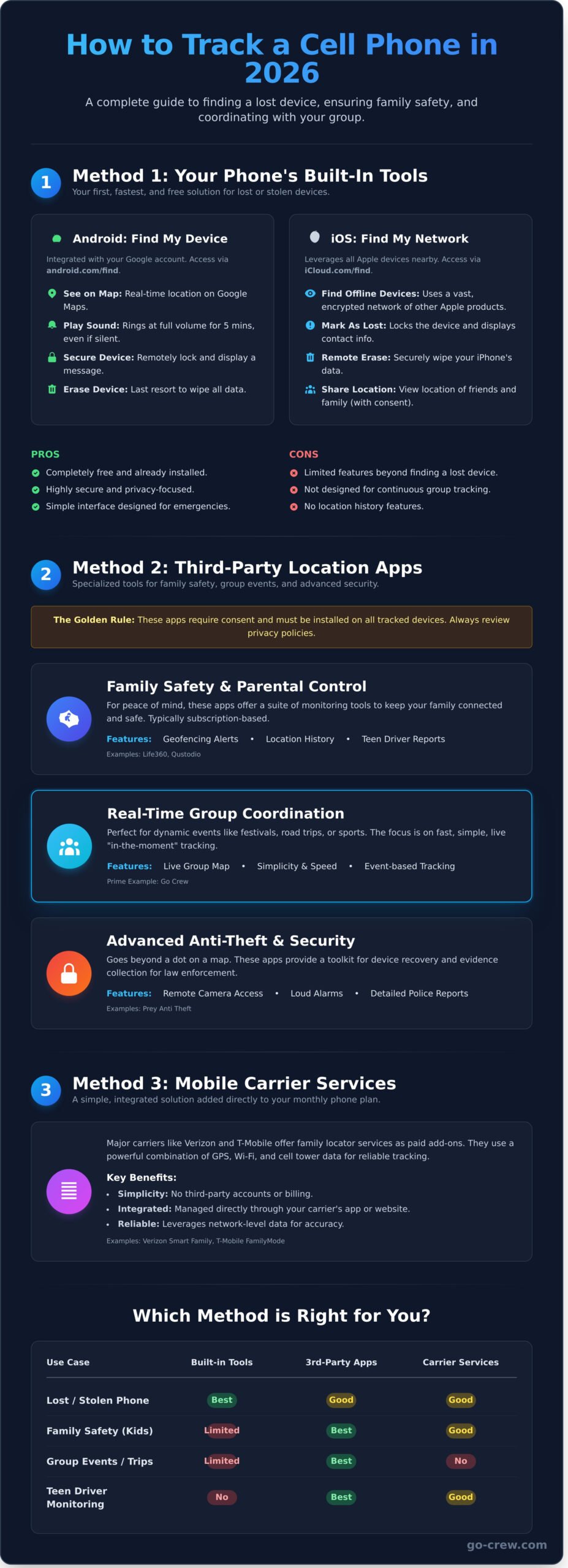
Before you download any third-party app, your first and best option is already on your phone. When you need to track a cell phone location because it’s lost or stolen, these built-in tools are your fastest solution. Both Android and Apple provide powerful, free services designed specifically for this purpose. These services use a combination of GPS, nearby Wi-Fi networks, and cell tower data to pinpoint your device. This blend of mobile phone tracking technologies ensures the most accurate position possible, whether your phone is indoors or out.
To see how simple this can be, check out this quick overview:
For Android Users: Google’s Find My Device
Google’s solution is powerful, simple, and integrated with your Google Account. Make sure it’s enabled by going to Settings > Security > Find My Device and toggling it on. If your phone goes missing, just visit android.com/find from any browser. From there, you can:
- See it on a map: Get a real-time location integrated with Google Maps.
- Play a sound: Make your phone ring at full volume for five minutes, even if it’s on silent.
- Secure device: Lock your phone remotely and display a message on the lock screen.
- Erase device: As a last resort, wipe all data to protect your privacy.
For iOS Users: Apple’s Find My Network
Apple’s Find My network is a game-changer, leveraging a vast, encrypted network of other Apple devices to find your phone even if it’s offline. To use it, open the Find My app on an iPad or Mac, or sign into iCloud.com/find. You can locate your iPhone, activate ‘Mark As Lost’ to lock it and display a contact number, or remotely erase your data. You can also use the app to see the location of friends and family who have shared it with you.
Pros and Cons of Built-In Tools
These native tools are essential, but it’s good to know their limits.
Pros:
- Completely free and already installed.
- Highly secure and privacy-focused.
- Simple interface designed for emergencies.
Cons:
- Limited features beyond finding a lost device.
- Not designed for continuous, real-time group tracking or location history.
Method 2: Leveraging Third-Party Location Sharing Apps
While built-in tools like Find My iPhone are great for finding a lost device, they often fall short for more specific needs. When you need advanced features, specialized third-party apps are the answer. These tools are designed for everything from family safety to coordinating a group on the move. The golden rule is simple: these apps require consent. They must be installed on every device you intend to track, with all users agreeing to share their location.
Before installing any app, it’s vital to review its privacy policy and the permissions it requests. The location data from your phone is highly sensitive, and understanding the broader ethics of phone tracking is important for making informed choices. Always choose reputable apps that are transparent about how they use your data.
Family Safety & Parental Control Apps
Designed for peace of mind, apps like Life360 and Qustodio help families stay connected and safe. They go beyond simple tracking to offer a suite of monitoring tools. Features often include:
- Geofencing: Get alerts when a family member arrives at or leaves a specific location, like school or home.
- Location History: Review past routes and locations.
- Driver Reports: Monitor speed, phone usage, and hard braking for teen drivers.
These comprehensive apps typically operate on a subscription model to unlock their full range of features.
Real-Time Group Coordination Apps
When you need to track a cell phone location for a group in real-time, simplicity and speed are key. These apps are perfect for dynamic activities like motorsports, group cycling, festivals, or road trips where knowing everyone’s exact position on a map is crucial. The focus isn’t on long-term monitoring but on live, “in-the-moment” coordination. Go Crew is a prime example built specifically for this purpose, eliminating clutter and focusing on fast, easy group tracking. See how Go Crew makes group tracking easy.
Advanced Anti-Theft and Security Apps
If your phone is stolen, you need more than just a dot on a map. Anti-theft apps like Prey Anti Theft provide a powerful toolkit for device recovery. They enhance basic location tracking with security features that can help you and law enforcement retrieve your device. These can include remote camera access to photograph the thief, loud alarms, on-screen messages, and detailed reports that consolidate evidence for a police investigation. Many offer a free tier with premium features available for a subscription.
Method 3: Using Your Mobile Carrier’s Services
Looking for a simple, integrated way to track cell phone location? Your own mobile provider might have the perfect solution. Major carriers like Verizon, T-Mobile, and AT&T offer family locator services that you can add directly to your monthly plan. No separate accounts, no third-party billing-just one simple, streamlined service.
These are typically paid add-ons, but they offer peace of mind with features often on par with dedicated tracking apps. The biggest win? Simplicity. Everything is managed through one account, making it a go-to option for busy families.
How Carrier Tracking Works
Carrier services leverage powerful network-based data to pinpoint a device’s location. They combine GPS, Wi-Fi, and cell tower triangulation for a reliable fix. You manage everything through your carrier’s app or website-it’s fast and user-friendly. Popular examples include:
- Verizon Smart Family: Offers location tracking, content filters, and screen time limits.
- T-Mobile FamilyMode: Provides real-time location monitoring and digital habits management.
- AT&T Secure Family: Includes location history, arrival/departure alerts, and web filtering.
When to Consider a Carrier Plan
While the free, built-in tools like Apple’s and Google’s Find My Device and Find My are fantastic for locating a lost phone, carrier services are designed for ongoing family monitoring and safety. This option is a great fit if you value convenience and ease of use above all else.
Consider a carrier plan if:
- You prefer all-in-one billing: Keep all your services under one provider and one monthly bill. Simple.
- You want an easy setup: These services are designed for anyone to use, regardless of tech-savviness. Activation is usually just a few clicks.
- You need more than just location: Many plans bundle location tracking with parental controls, offering more comprehensive family safety tools.
Before you commit, compare the monthly fee (typically $5-$10 per month) to the features you get. For many, the ability to easily track cell phone location without juggling extra apps is well worth the cost.
Method 4: Understanding the Ethics of Phone Tracking
The technology to track cell phone location is powerful, but it’s not just about pins on a map. When you track a phone, you’re tracking a person. This section moves beyond the ‘how’ to focus on the ‘why’ and ‘when’-the crucial ethics of location sharing. Remember, trust is always more important than technology.
The Golden Rule: Always Get Consent
Informed consent is simple: the person you want to locate must agree to it, knowing what app you’re using and why. Tracking a phone you don’t own without the user’s explicit permission isn’t just unethical; it’s illegal in most jurisdictions. The goal should never be surveillance. Instead, frame location sharing as a mutual agreement for safety, convenience, and better coordination during group events.
Talking to Your Family and Friends
Open communication is key. When talking with your kids, frame location sharing as a safety tool, not a way to control them. It’s for emergencies and for peace of mind. For friends, focus on the practical benefits-no more “where are you?” texts when meeting up at a concert, festival, or on a group bike ride. It’s about simplifying plans and spending less time finding each other and more time having fun.
Recognizing Red Flags in Tracking Apps
Not all tracking apps are created equal. Stay safe and protect your privacy by spotting these common red flags:
- Impossible Promises: Any service that claims it can track a phone with just a number is almost certainly a scam or malicious. Real tracking requires an app to be installed or uses official carrier or emergency services.
- Excessive Permissions: Does a location app really need access to your camera, microphone, or contacts? If the permissions don’t match the app’s core function, think twice before installing.
- Lack of Transparency: Look for a clear privacy policy and a reputable developer. Apps designed for mutual consent, like Go Crew, are built on transparency and give users full control over their data.
Which Method is Right for You? A Quick Guide
You’ve learned about the different ways to track cell phone location, but which one is the right tool for your specific job? The answer depends entirely on your goal. Whether you’re in a panic over a lost device or trying to wrangle a group of friends at a festival, the best method is the one built for your exact situation.
Use this quick guide to match your need with the perfect solution. No fluff, just fast answers.
If You Lost Your Phone…
Your first and best move is to use your phone’s built-in location service. Don’t waste time with third-party apps. These tools are fast, free, and designed for this exact emergency.
- For Android users: Use Google’s Find My Device immediately.
- For Apple users: Use Apple’s Find My on another device or iCloud.com.
Act quickly to see your phone on a map, make it ring, or remotely lock it to protect your personal data. Speed is your biggest advantage here.
If You Want to Keep Your Family Safe…
For ongoing peace of mind, a dedicated family safety app is a powerful choice. These apps offer more than just a dot on a map; they provide features like geofencing (getting alerts when a child leaves school) and location history. The built-in “Find My” tools can also work for simple check-ins.
The key is consent. Have an open and honest conversation with your family members about using these tools. The goal is safety and trust, not surveillance.
If You Need to Coordinate a Group Activity…
This is where other methods fall short. Trying to coordinate a group for a road trip, festival, or cycling event with a family safety app is clunky and slow. You don’t need parental controls; you need speed and simplicity.
You need a tool built for one purpose: real-time, multi-user tracking on a single, easy-to-read map. An app designed for temporary, dynamic groups eliminates the hassle of complex setups and unnecessary features. This is precisely why we built Go Crew-to make group location sharing instant and effortless.
Stop the endless “Where are you?” texts and see everyone in one place. Organize your next event or trip with Go Crew for free!
Find Your Way: The Smartest Path to Location Sharing
As we’ve seen, you have powerful tools at your disposal, from your phone’s built-in features to specialized carrier services. The key is choosing the right approach. Whether you’re finding a misplaced device or ensuring a loved one is safe, the best way to track cell phone location always starts with understanding your specific needs and, most importantly, respecting privacy.
But when the goal is coordinating a group in motion, you need a solution built for speed. Forget complicated setups. For real-time group location sharing that’s perfect for motorsports, cycling, and festivals, Go-Crew is the answer. It’s designed for TIME-SAVING & SIMPLICITY, making it easier than ever to keep your team in sync without any interruptions.
Stop losing your friends in the crowd and start making memories. Ready to coordinate your crew? Try Go Crew for free! Get on the same map and make every moment count.
Frequently Asked Questions
Can you track a cell phone with just the number?
Generally, no. While law enforcement and mobile carriers have the technology, public services claiming to track a phone with only a number are typically not legitimate. For personal use, effective tracking requires consent and prior setup. This usually means installing a location-sharing app or using a built-in service like Apple’s Find My, which is tied to a user account, not just the phone number itself. Real-time tracking always requires more than just the digits.
Do location tracking apps drain your phone’s battery?
Yes, any app using GPS will impact your battery, but modern apps are built for efficiency. They minimize drain by using a smart combination of GPS, Wi-Fi, and cell tower signals-a method called Assisted GPS. An app that provides constant, real-time updates will use more power than one that updates periodically or on-demand. For best performance, look for apps that offer customizable update frequencies or a specific battery-saving mode to balance tracking with battery life.
How accurate is cell phone location tracking?
Accuracy depends entirely on the signal strength and technology used. With a clear view of the sky, GPS can be incredibly accurate, often pinpointing a device within 5-10 meters (16-30 feet). However, when you track cell phone location indoors or in dense urban areas, accuracy drops. The phone then relies on Wi-Fi or cell tower triangulation, which can have a range from 50 to several hundred meters. The quality of the device and app also plays a crucial role.
Can you track a phone if it is turned off or has no service?
No, a phone cannot be tracked in real-time if it is turned off or has no signal. A device must be powered on and connected to a network (cellular or Wi-Fi) to transmit its location data. Most tracking services will only be able to show you the phone’s last known location before it lost power or connection. Some very new devices have a low-power mode to remain findable for a few hours after shut down, but this is not yet a standard feature.
What is the most secure way to share my location with someone?
The most secure methods are built into your phone’s operating system or use end-to-end encrypted messaging apps. Features like “Find My” on iOS or Google Maps’ “Location Sharing” are tied to your secure personal accounts. For temporary sharing, apps like WhatsApp and Signal allow you to share your live location for a preset time limit. The key is to use a trusted service that gives you complete control over who sees your location and for how long.
Is it legal to track my child’s phone without their knowledge?
In most regions, parents have the legal right to monitor their minor children (under 18) as part of their parental responsibility. However, laws can vary, so it’s always smart to check your local regulations. While legally permissible, building trust through open communication is often more effective, especially with teenagers. Remember, tracking any adult-including your own adult children-without their explicit and informed consent is illegal and a serious invasion of privacy.
