


Does the thought of installing a vehicle tracking device make you hesitate? You’re not alone. The complicated wiring, the fear of damaging your vehicle’s electronics, and the confusing subscription fees can feel overwhelming. You want peace of mind and easy coordination, not a complex technical project that costs you time and money.
It’s time for a simpler way. This complete 2026 guide is all about speed and simplicity. We’ll cut through the confusion and give you a clear, step-by-step walkthrough for installing a traditional hardwired tracker. More importantly, we’ll introduce you to the modern, no-installation alternative: using a powerful tracking app that puts real-time location sharing right on your phone. No wires, no expensive hardware, no hassle. Get ready to find the perfect tracking solution that’s fast, easy, and ready to go in minutes.
Key Takeaways
- Learn the three main installation methods for hardware trackers, from simple plug-and-play to more discreet hardwired options.
- Discover the modern, no-installation alternative that turns your smartphone into a real-time tracker in under 60 seconds.
- Understand the core differences between hardware and apps to choose the best vehicle tracking device for your specific needs.
- Get a clear, step-by-step guide to get your tracker-whether it’s a physical unit or an app-up and running fast.
First, What Are the Main Types of Vehicle Tracking Devices?
Before you start drilling holes or downloading apps, let’s get one thing straight. The term ‘vehicle tracking device’ can mean two very different things: a physical piece of hardware you install in your car, or a software-based app on your smartphone. The best choice for you boils down to one simple question: What’s your goal?
Are you looking for a permanent, anti-theft security system? Or do you need fast, real-time location sharing for a group drive, convoy, or motorsport event? Understanding this difference is key to choosing the right solution.
To see just how simple a hardware installation can be, check out this quick video:
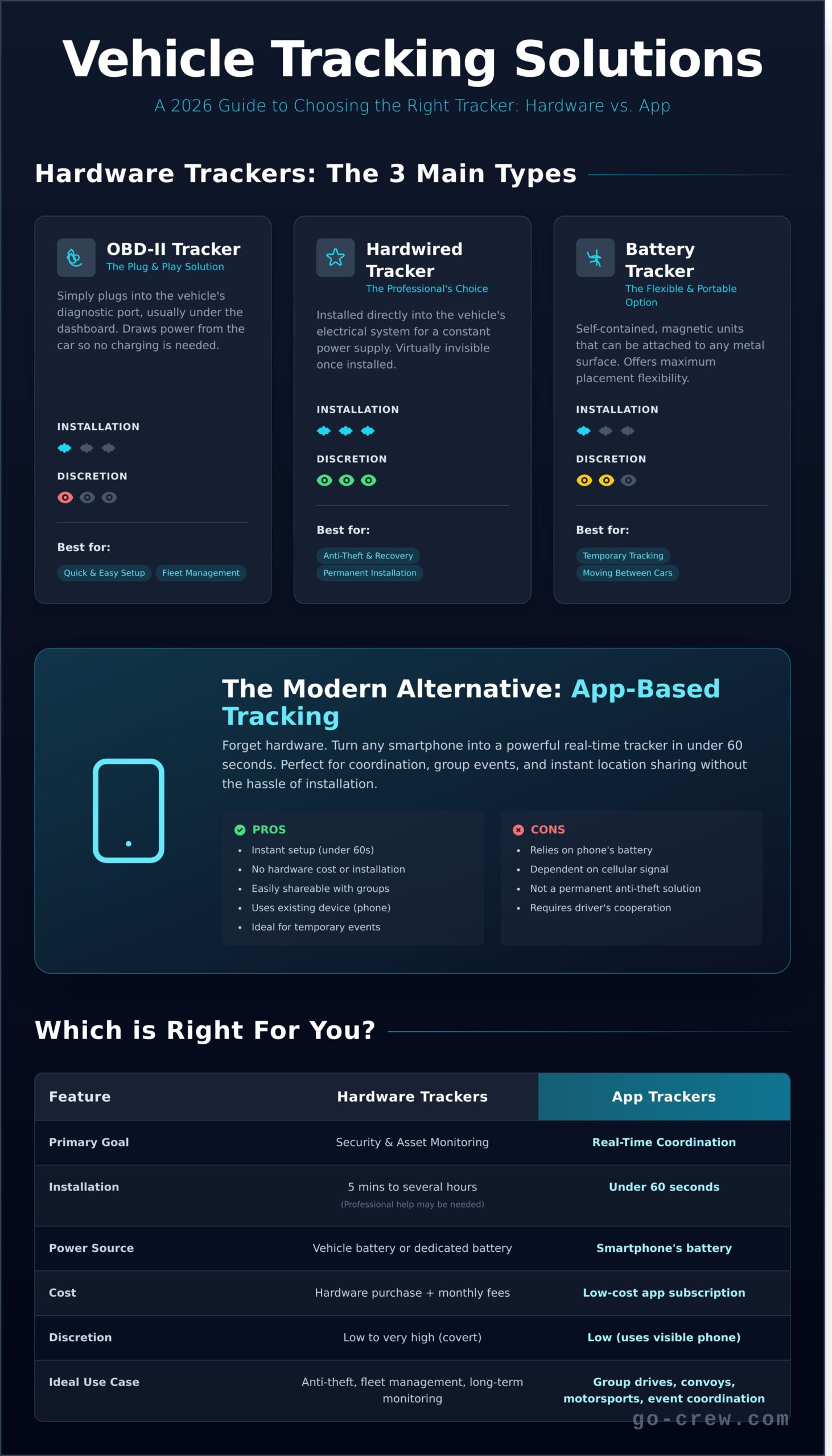
Traditional hardware trackers are dedicated pieces of equipment designed for one job: reporting your vehicle’s location. A typical GPS tracking unit uses satellite signals to pinpoint its coordinates and then transmits that data via a cellular network. These devices generally fall into three main categories, each with its own pros and cons for different situations.
OBD-II Port Trackers
These are the definition of plug-and-play. You simply plug the device directly into your vehicle’s On-Board Diagnostics (OBD-II) port, usually found under the dashboard. It draws power from the car, so you never have to worry about batteries. The downside? Its location is obvious, making it the first thing a savvy thief will look for and discard.
Hardwired Trackers
For a more covert solution, hardwired trackers are installed directly into your vehicle’s electrical system. This makes them virtually invisible and ensures they have a constant power supply, making them highly effective for theft recovery. However, this type of installation is more complex and typically requires a professional mechanic to get the job done right.
Battery-Powered Magnetic Trackers
Offering maximum flexibility, these are self-contained, portable units with powerful magnets. You can attach them to any metal surface on your vehicle-inside or out-in seconds. This is great for temporary tracking or moving a device between cars. The major trade-off is battery life; you’ll need to retrieve and recharge them regularly, sometimes every few days or weeks.
How to Install a Hardware Vehicle Tracker: 3 Methods
Ready to get your hardware tracker up and running? The right installation method depends entirely on your goal: are you looking for speed, covert security, or flexibility? Each type of vehicle tracking device has a unique process. Before you begin, it’s wise to consider the implications of tracking technology and the importance of Locational Privacy, as this can influence which method you choose. Let’s break down the three main installation paths so you can get started quickly and correctly.
Method 1: Installing an OBD-II Tracker (The Easy Way)
This is the definition of plug-and-play. If you want a tracker working in minutes with zero tools, this is your solution. It draws power directly from the port, so you never have to worry about charging.
- Step 1: Locate the OBD-II Port. On most vehicles made after 1996, this port is located under the dashboard on the driver’s side, often near the steering column or pedals.
- Step 2: Plug It In. Simply push the device into the port until you feel or hear it click into place. A status light on the tracker should illuminate.
- Step 3: Activate. Follow the manufacturer’s instructions to sync the device with your account, usually through a mobile app or website.
The trade-off for this 5-minute install is discretion. Since it’s easy to access, it’s also easy for anyone to spot and remove.
Method 2: Installing a Hardwired Tracker (The Pro Way)
For a permanent, hidden installation that’s ideal for theft recovery and fleet management, hardwiring is the gold standard. It’s powered directly by the vehicle’s battery and can be concealed deep within the dashboard.
Important Disclaimer: We strongly recommend professional installation for this method. Incorrectly tapping into your vehicle’s electrical system can cause serious, expensive damage. If you proceed, you’ll need tools like a multimeter, wire strippers, and electrical tape.
The general steps involve disconnecting the car battery for safety, locating a constant power wire and a ground wire, and carefully connecting the tracker’s corresponding wires. This is the most secure and reliable way to install a vehicle tracking device, but it’s also by far the most complex.
Method 3: Placing a Battery-Powered Tracker (The Flexible Way)
If you need to move a tracker between assets or want an install with zero wiring, a battery-powered unit is perfect. These often come with strong built-in magnets for easy placement.
- Step 1: Charge the Device. Before you do anything, make sure the tracker’s battery is fully charged for maximum life.
- Step 2: Find a Secure Spot. The best locations are on flat, metal surfaces. Common spots include the vehicle’s frame, inside a bumper, or hidden under a seat.
- Step 3: Attach and Go. Secure the tracker firmly. Make sure it’s not placed near high-heat sources like the engine block or exhaust pipe.
The main task here isn’t the initial placement-it’s remembering to retrieve and recharge the device periodically. Set a calendar reminder!
The Modern Alternative: No-Installation Tracking with Your Phone
Before you start pulling out tools and wiring diagrams, consider the powerful tracking tool you already own: your smartphone. While a traditional hardwired vehicle tracking device has its place for permanent security, many daily coordination needs can be solved instantly with a dedicated app. It’s the modern approach focused on two things: TIME-SAVING & SIMPLICITY.
Forget about hardware costs, installation appointments, and being tied to a single car. For dynamic, real-time group tracking, an app-based solution is often faster, more flexible, and completely free. Group location sharing couldn’t be easier than this.
How Does App-Based Tracking Work?
It’s brilliantly simple. An app like Go Crew uses your phone’s built-in GPS to pinpoint your location. You then create a private, secure group and invite others to join. The app shares everyone’s real-time position on a single map, visible only to group members. Because the tracker is your phone, it goes wherever you go-your car, a friend’s truck, or your motorcycle. It isn’t permanently fixed to one vehicle.
When is an App a Better Choice?
A mobile app excels where hardware is overkill. It’s the perfect solution when you need an instant, temporary, and flexible way to see your group’s location. This is a smarter alternative to a permanent vehicle tracking device for situations like:
- Group Road Trips & Convoys: See everyone’s position in real-time on the highway. No more “where are you?” texts or missed exits when traveling with friends, car clubs, or on a motorcycle ride.
- Small Business Coordination: Track your delivery drivers, service technicians, or sales team during work hours without the expense and complexity of a professional fleet management system.
- Events and Meetups: Effortlessly coordinate staff, volunteers, or participants across a large festival ground or event venue.
- Recreational Outings: Keep track of your friends during a group cycling tour, off-road adventure, or hiking trip.
The bottom line? If your goal is real-time coordination with a group of people, not just asset protection for a single vehicle, an app-based solution offers all the functionality you need with zero installation and zero cost.
How to ‘Install’ a Vehicle Tracking App in Under 60 Seconds
Forget tangled wires, complex manuals, and waiting for a package to arrive. Installing a modern vehicle tracking device doesn’t require tools-it requires a tap on your screen. With an app like Go Crew, the entire ‘installation’ is simply the process of setting up your group, and it takes less than a minute. This is group location sharing designed for TIME-SAVING & SIMPLICITY.
Unlike traditional hardware that requires physical connection to your car, this software-based approach uses the smartphone everyone already has. Let’s walk through the three simple steps to get you on the map, fast.
Step 1: Download and Register
Your first move is the fastest. There’s no hardware to order and no waiting for a delivery. Just pure, instant action. Head straight to your phone’s app store.
- Download the Go Crew app from the App Store or Google Play.
- Complete the quick and simple registration process.
That’s it. No tools, no fuss. You’re already ahead of any physical installation process.
Step 2: Create Your ‘Crew’
A ‘crew’ is your private, real-time map where only the people you invite can see each other’s location. It’s your secure bubble for any group activity. Give your crew a name-like ‘Weekend Road Trip’ or ‘Festival Convoy’-to create your dedicated, invitation-only tracking space. This ensures your location is only shared with the people you trust, for the duration you choose.
Step 3: Share the Link and Go!
Now, bring your group together. Go Crew generates a simple, secure link for your crew. Share it via your favorite messaging app. As soon as your friends click the link and join, they instantly appear on your live map. The ‘installation’ is complete.
You’ve just set up a powerful group vehicle tracking solution without touching a single wire. You’re ready to track, navigate, and stay connected in real-time. Group Location Sharing Couldn’t Be Easier Than This.
Try it now and set up your first crew for free!
Hardware vs. App Trackers: Which Is Right for You?
Choosing the right tracking solution comes down to one thing: your goal. Are you protecting an asset or coordinating with people? The answer determines whether you need a physical vehicle tracking device or a flexible mobile app. Let’s break down the key differences to help you decide. Fast. Simple. Real-time.
Installation & Portability
Hardware trackers require physical installation, from simple plug-and-play OBD-II devices to more complex hardwired units. Once installed, they are tied to that specific vehicle. Apps, on the other hand, require zero installation-just a download to your smartphone. This makes them instantly portable, moving with you from your car to your motorcycle to a friend’s vehicle.
- Hardware: Physical install, tied to one vehicle.
- App: Instant setup, moves with your phone.
- Winner for Simplicity & Flexibility: App
Cost
The financial commitment is another major difference. A hardware-based tracker involves an upfront cost for the unit itself (typically $20-$200), followed by a mandatory monthly subscription for data and service. Apps often operate on a freemium model. You can start for free and only pay if you need premium features, making them far more accessible.
- Hardware: Upfront device cost + required monthly fee.
- App: Often free to start, with optional upgrades.
- Winner for Affordability: App
Primary Use Case
This is where the choice becomes crystal clear. A hardware vehicle tracking device is built for asset security. Because it’s permanently installed and powered by the vehicle, it’s ideal for anti-theft, vehicle recovery, and fleet management. It tracks the asset. Apps are designed for coordinating people. They excel at real-time location sharing for group rides, convoys, or meeting up at an event. The focus is on dynamic, live interaction.
- Hardware is for: Anti-theft, asset recovery, covert tracking.
- App is for: Live coordination, group events, temporary tracking.
So, what’s the verdict? If your primary goal is 24/7 vehicle security and recovery, a dedicated hardware tracker is the right tool. But if you need fast, easy, and real-time location sharing to coordinate with your crew on the move, a powerful app is the modern solution. For group tracking that couldn’t be easier, solutions like the Go-Crew app are built specifically for that purpose.
Skip the Wires: The Smartest Way to Track Your Vehicles
As we’ve seen, installing a traditional hardware tracker involves choices-from simple OBD-II plug-ins to complex hardwired setups. While powerful, they often require time and technical know-how. But the landscape is changing. The most revolutionary vehicle tracking device might already be the smartphone in your pocket, offering real-time group location sharing without any wires or waiting.
Why get tangled in complicated installations when you can be up and running in seconds? If TIME-SAVING & SIMPLICITY are your priorities, the choice is clear. Go Crew is built for groups that need to move fast. Trusted by motorsports, cycling, and event crews who demand instant coordination, you can set up your entire group and be on the map in under 60 seconds. Group location sharing simply couldn’t be easier.
Ready to experience the future of tracking? Download Go Crew for free and get your team connected instantly! Stop waiting and start coordinating.
Frequently Asked Questions
Can I use my phone as a vehicle tracking device?
Absolutely. Your smartphone is a powerful tool for real-time location sharing. With the right app, it becomes an effective vehicle tracker, perfect for coordinating with friends or keeping an eye on your car. Apps are designed for simplicity and speed, letting you start tracking in minutes. They use your phone’s built-in GPS, so there’s no extra hardware to worry about. Just download, set up, and you’re on your way.
Is it legal to install a GPS tracking device on a vehicle?
Yes, it’s legal to install a tracker on a vehicle you own. You can track your own car, company vehicles (with employee notification), or your child’s car. However, tracking a vehicle you don’t own without the owner’s consent is illegal in most places. Always check your local laws, but the simple rule is: if it’s your car or you have permission, you’re in the clear. Tracking without consent is a major privacy violation.
Do vehicle tracking apps drain my phone’s battery?
Any app using GPS will use some battery, but modern tracking apps are built for efficiency. They are optimized to minimize battery drain while providing fast, real-time updates. Many apps use smart tracking, which only updates your location when necessary, saving power when you’re parked. While you might notice a slight increase in usage, it’s designed to be minimal and not interrupt your day. It’s a small trade-off for powerful, live location sharing.
What’s the difference between a GPS tracker and something like an Apple AirTag?
The key difference is the technology. A GPS tracker uses satellites for precise, real-time location updates anywhere with a signal. It’s live and continuous. An AirTag uses Bluetooth, relying on a network of nearby Apple devices to report its location. It’s great for finding lost keys in a populated area but isn’t a true real-time tracker for a moving vehicle, especially in remote locations. For live pursuit and group rides, GPS is the only way to go.
Do I need a monthly subscription for a vehicle tracking device?
It depends on the solution you choose. Many dedicated hardware trackers require a monthly subscription to cover cellular data costs for transmitting location info. This is where app-based solutions shine. Many apps offer powerful tracking features without a recurring monthly fee, using your phone’s existing data plan. This makes it a simpler, more cost-effective way to get a powerful vehicle tracking device up and running instantly.
How accurate are app-based vehicle trackers compared to hardware?
Modern smartphones have incredibly accurate GPS chips, making app-based trackers highly precise for almost all everyday needs. For group rides, meetups, or personal security, the accuracy is more than enough and often rivals dedicated hardware. While some specialized hardware might offer a slight edge in extreme conditions, a phone-based vehicle tracking device provides a fast, simple, and remarkably accurate solution without the extra cost and installation hassle.
