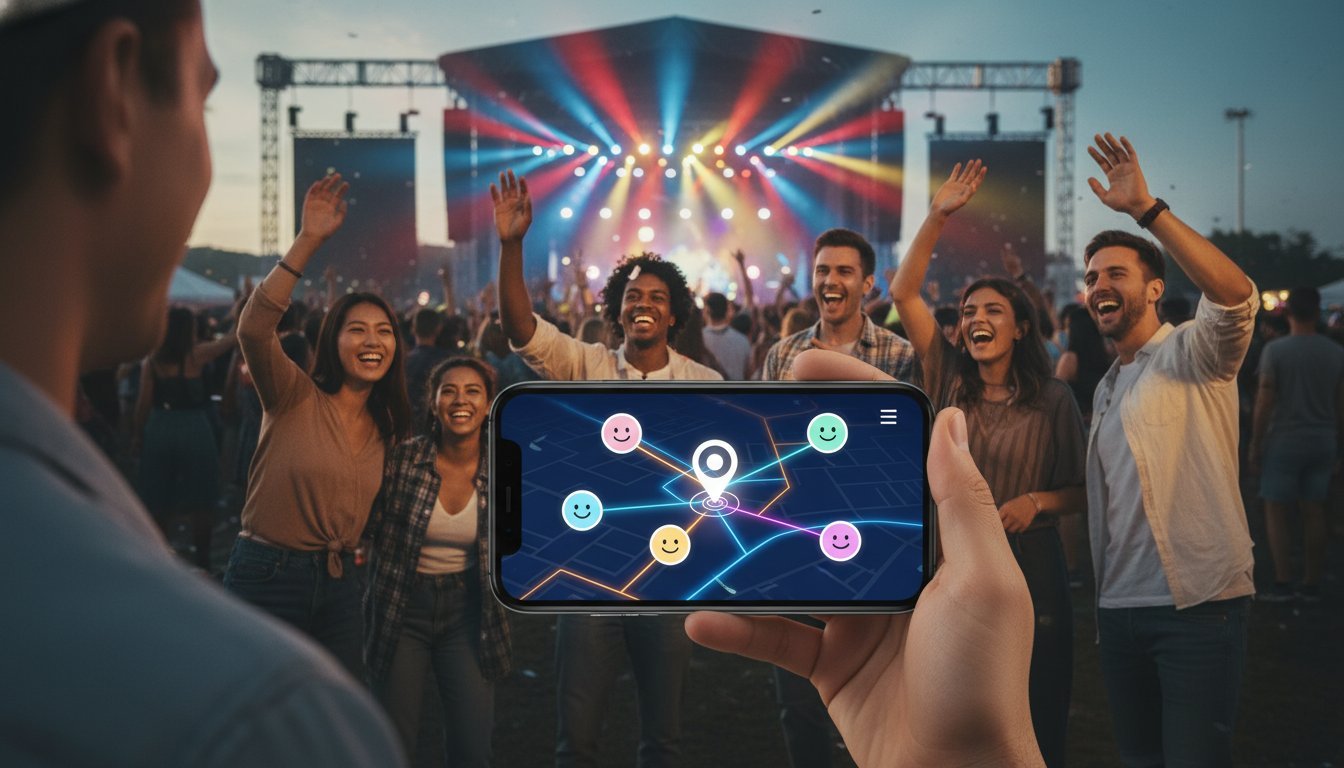

The festival is pumping, but half your crew is missing. Your group chat is blowing up with a hundred “Where are you?” messages, and the simple act of meeting up has become a chaotic mess. Sound familiar? The endless back-and-forth is a massive waste of time and a total vibe-killer. It’s time to ditch the stress. A powerful group location sharing app puts your entire crew on a single, live map, making coordination fast, easy, and real-time. Just like it should be.
But as we head into 2026, the options are overwhelming. How do you find an app that’s reliable and user-friendly without draining your battery or selling your data? That’s where we come in. This is your ultimate, no-nonsense guide. We’ll cut through the noise to show you exactly how group location sharing works, what essential features to look for, and how to pick the perfect app to keep your crew seamlessly connected. Get ready to save time and make every meetup effortless.
Key Takeaways
- Discover how group location sharing is for more than just family-think road trips, festivals, and team meetups.
- Cut through the noise and identify the essential app features you actually need, saving time and avoiding gimmicks.
- Get straight answers on battery drain and privacy so you can share your location with total confidence.
- Use our simple framework to choose the perfect group location sharing app for your crew, from identifying your needs to testing the right fit.
What is a Group Location Sharing App (And How Does It Work)?
Forget the endless chain of “Where are you?” texts. A group location sharing app is a tool designed for one simple purpose: to show the real-time position of everyone in your private group on a single, live map. It’s coordination made easy, fast, and without any interruptions.
Unlike the basic “share my location” feature in messaging apps like iMessage or WhatsApp-which often just sends a static pin-these dedicated apps provide a dynamic, constantly updated view of your entire crew. The goal is to sync up effortlessly, whether you’re in a convoy on the highway, meeting at a festival, or keeping track of your family on a day out.
See how simple the concept is in action with this quick overview:
So, how does it all work? In short, these apps use a combination of your phone’s built-in GPS for pinpoint accuracy and cellular or Wi-Fi data to transmit that position to the other members of your group. The app’s server processes these updates and displays them on a shared map interface, often using mapping APIs from providers like Google Maps. If you’re curious about the specifics of how location tracking works, it’s a fascinating blend of satellite signals and network triangulation.
The Core Components of a Group Tracking App
While features vary, every effective group location sharing app is built on a few key elements:
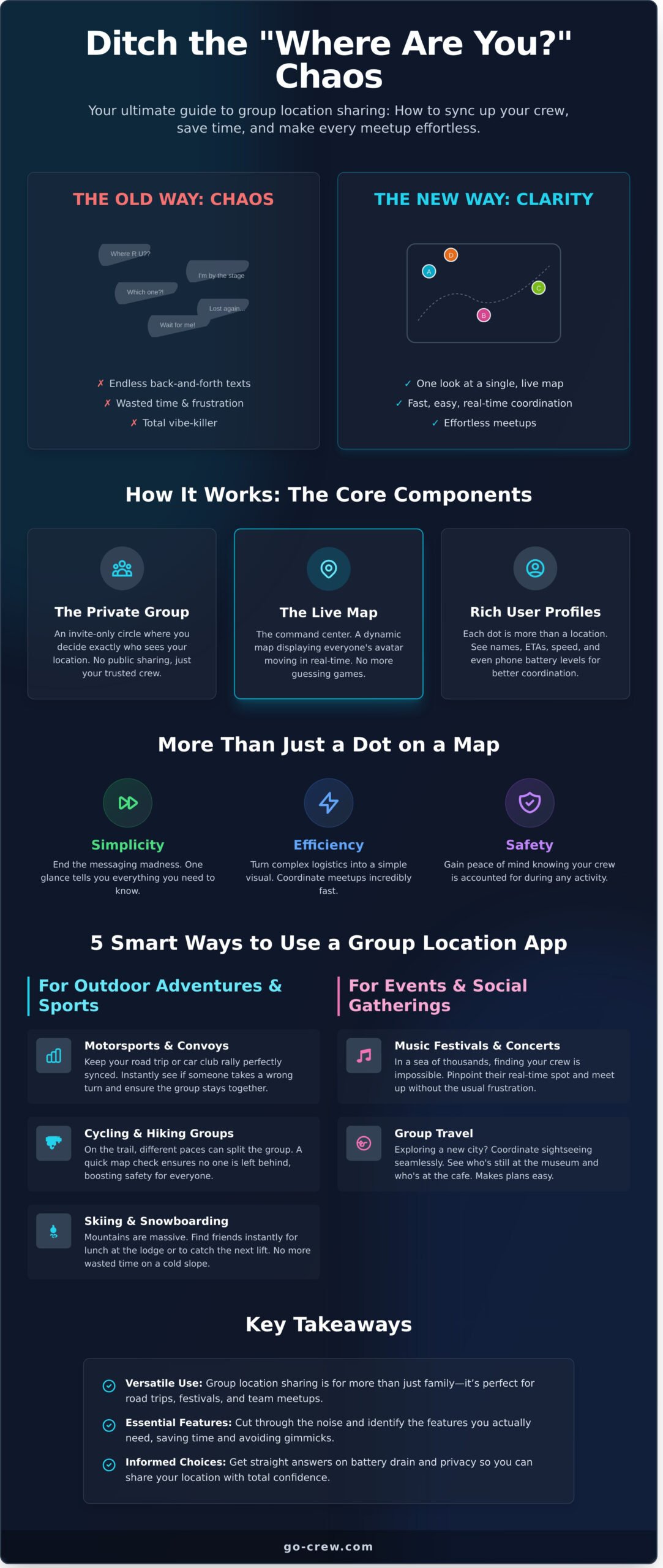
- The Group/Crew: The foundation is a private, invite-only circle. You decide exactly who can see your location, and only for a specific time or event. No public sharing, just your trusted crew.
- The Live Map: This is the command center. It’s a dynamic map that displays everyone’s avatar, moving in real-time as they do. No more guessing games.
- User Profiles: Each dot on the map is more than just a location. Profiles often show an avatar, name, and may include useful stats like current speed, ETA, or even phone battery level.
Key Benefits: More Than Just a Dot on a Map
Using a dedicated app for group tracking delivers immediate, practical advantages:
- Simplicity: End the back-and-forth messaging for good. One look at the map tells you everything you need to know, saving time and frustration.
- Efficiency: Turn complex logistics into a simple visual. Coordinating meetups, road trips, or finding friends in a crowded space becomes incredibly fast and straightforward.
- Safety: Gain peace of mind by knowing your friends or family are safe during group hikes, cycling trips, or a night out. It’s a simple way to make sure everyone is accounted for.
7 Smart Ways to Use a Group Location Sharing App
Think beyond the family tracker. While great for peace of mind at home, a powerful group location sharing app is your key to effortless, real-time coordination in almost any scenario. It’s all about time-saving and simplicity, eliminating the endless “Where are you?” texts. Group location sharing couldn’t be easier than this.
Here are seven smart ways to put this tech to work for you.
For Outdoor Adventures & Sports
When you’re on the move, staying connected is crucial for both fun and safety. An app designed for dynamic groups makes it simple.
- Motorsports & Convoys: Keep your road trip convoy or car club rally perfectly synced. No more lost drivers at confusing interchanges. Instantly see if someone has pulled over or taken a wrong turn, ensuring the group stays together from start to finish.
- Cycling & Hiking Groups: On the trail, different paces can split the group. A quick map check ensures the lead riders don’t get too far ahead and that no one is left behind, boosting safety for everyone.
- Skiing & Snowboarding: Mountains are massive and it’s easy to get separated. Find your friends instantly, whether you’re meeting for lunch at the lodge or catching up on the next lift. No more wasted time on a cold slope.
For Events & Social Gatherings
Navigating huge crowds or new places is a challenge. A shared map gives your group a massive advantage.
- Music Festivals & Concerts: In a sea of thousands, finding your crew is nearly impossible. Pinpoint your friends’ real-time spots and meet up at the main stage or food truck without the usual frustration.
- Group Travel: Exploring a new city? Coordinate sightseeing seamlessly. See who’s still at the museum and who’s already at the designated cafe. It makes spontaneous plans easy and ensures no one gets truly lost.
For Simple Business & Team Coordination
For small, agile teams, a simple group location sharing app is a fast and user-friendly tool for improving efficiency on the ground.
- Small Delivery Teams: This is simple dispatching without the expensive software. See where your drivers are to give customers accurate ETAs and efficiently assign the next pickup.
- Field Service Techs: When your team is spread across a large job site, a quick look at the map shows who is closest to handle the next task, saving time and streamlining workflow.
Essential Features to Look For (And What to Ignore)
Not all location sharing apps are built the same. Some are loaded with features you’ll never touch, while others just get the job done-fast. The key is knowing what actually matters for your crew. Cut through the noise and focus on functions that deliver real value. This guide separates the non-negotiable core features from the “nice-to-have” extras, so you don’t pay for bloat.
The Must-Have Features for Any Group
These are the absolute essentials. If an app doesn’t nail these four points, move on. Your coordination depends on it.
- Real-Time Accuracy: Your map needs to show where your friends are now, not where they were five minutes ago. For fast-paced activities like motorsports or cycling, instant updates are critical for staying in sync.
- Low Battery Consumption: A great app works intelligently in the background. It shouldn’t drain your battery before the event is even over. Look for smart tracking that conserves power without sacrificing accuracy.
- Strong Privacy Controls: You are in command. The best apps let you easily control who sees your location and for how long. You should be able to go “off-grid” with a single tap.
- Ease of Use: Simplicity is everything. A top-tier group location sharing app lets you create a group and invite friends in under a minute. No complex sign-ups, no confusing menus.
Advanced Features for Power Users
These features are powerful but not essential for every user. Consider them valuable upgrades if your group’s activities demand more advanced coordination.
- Geofencing & Place Alerts: Get automatic notifications when someone enters or leaves a designated area-like the festival entrance or the final meetup point. It’s coordination without constant check-ins.
- Location History: Want to review that perfect road trip route or see where everyone went? Location history lets you replay the day’s movements, which is perfect for reliving an adventure.
- Speed & Heading Data: Essential for vehicle convoys and organized bike rides. This feature shows you not just where your friends are, but how fast they’re going and in which direction.
- In-App Messaging: Keep all communication in one place. Integrated chat means you don’t have to jump between your map and a separate messaging app to send a quick update.
Focus on the must-haves first. A streamlined, fast, and reliable group location sharing app will always beat a bloated, complicated one.
Privacy & Battery Life: Addressing the Two Biggest Concerns
Let’s cut to the chase. When you consider using a group location sharing app, two questions immediately come to mind: “Will it kill my battery?” and “Is my data safe?” These are valid concerns, and the good news is that modern apps are built from the ground up to solve them. Forget the myths-here’s the reality.
Will It Drain My Battery? A Realistic Look
The idea of constant GPS tracking sounds like a recipe for a dead battery, but technology has gotten much smarter. The best apps don’t just run your GPS nonstop. They use intelligent, adaptive updates, refreshing your location only when necessary to give your group the real-time information it needs without wasting power.
In most cases, running a location sharing app in the background for an hour uses less power than 30 minutes of scrolling through social media or streaming video. To maximize your battery life, here are a few simple tips:
- Adjust Update Frequency: If the app allows, choose a less frequent update interval when high-precision tracking isn’t critical.
- Set Permissions Wisely: In your phone’s settings, allow the app to access your location only “While Using the App.”
- Close When Done: Once your event, ride, or meetup is over, simply close the app. No need to keep it running.
Is My Location Data Safe? How to Protect Your Privacy
Your location is sensitive data, and you should be in complete control of it. A trustworthy group location sharing app is designed around privacy, not surveillance. The key difference is that you are sharing your location within a temporary, private circle-not broadcasting it to the world.
Always look for apps that offer end-to-end encryption and have a clear, easy-to-understand privacy policy. Your location data should only be visible to the people you explicitly invite, and only for the duration you choose. When the group is deleted, the sharing link should be broken permanently.
You hold the power. By managing your phone’s permissions and choosing the right tool, you can get all the benefits of easy coordination without compromising on security. Go Crew is built for privacy with simple, temporary groups. We don’t store your location history-once a group is gone, so is the data. It’s coordination without compromise.
How to Choose the Right App for Your Crew
With so many options available, finding the right group location sharing app for your specific needs doesn’t have to be complicated. Instead of getting lost in feature lists, follow this simple, three-step framework to make a fast, effective decision and get your crew coordinated without the hassle.
Step 1: Define Your Primary Use Case
The best app is the one that fits your activity perfectly. Before you download anything, ask yourself what you’ll be using it for most often. Your primary goal will determine which features are critical and which are just noise. Consider if your main need is for:
- A one-off event: Coordinating with friends at a music festival, a road trip convoy, or a large public gathering where finding each other is the main challenge.
- Recurring activities: Keeping your weekly cycling club, hiking group, or car meetup in sync on the move.
- Daily professional coordination: Managing a small delivery team, event staff, or field technicians who need to be on the same page all day.
Step 2: Match Features to Your Needs
Once you know your “why,” you can focus on the “what.” Not all features are created equal. Focus on what will actually make your coordination easier. Do you need high-frequency, real-time updates for tracking fast-moving motorsports, or is a slower refresh rate fine? Is simplicity the top priority, or do you want an app loaded with chat, places, and social features? Critically, ensure the app works for everyone-does your group use iPhones, Androids, or a mix of both?
Step 3: Start with a Free, Simple Option
The smartest way to choose is to test. Before committing to a paid plan or a complex ecosystem, start with an app that offers a robust free tier. This allows you to test the core functionality and, more importantly, ensures everyone in your group can easily install it and get started. An app is useless if your crew won’t use it. The goal is to find a tool that is fast, reliable, and intuitive for every member. For this, Go Crew’s free plan is perfect for getting started in minutes.
Stop Waiting, Start Connecting: The Final Word on Group Coordination
As we’ve explored, the best group location sharing app for 2026 is more than just a tool; it’s a solution to wasted time and frustrating logistics. By prioritizing essential features like real-time accuracy and intuitive controls-while understanding how to manage privacy and battery life-you can transform how your crew connects. The goal is simple: spend less time asking “Where are you?” and more time enjoying the moment together.
If you’re tired of the clutter and complexity, your choice is clear. At Go Crew, our entire mission is built on TIME-SAVING & SIMPLICITY. We deliver powerful, real-time tracking designed specifically for fast-paced activities like motorsports, cycling, and festivals. Forget endless menus and confusing onboarding. You can set up your crew and get on the map in under a minute. Group coordination couldn’t be easier.
Ready to simplify your group coordination? Download Go Crew for free! Stop chasing your friends and start your next adventure together.
Frequently Asked Questions
What’s the difference between a group location sharing app and Find My Friends?
Find My Friends is designed for a permanent, trusted circle like family. A group location sharing app, however, is built for temporary events and one-off coordination. Think of a weekend road trip, a festival, or a cycling convoy. You create a temporary group with a simple link, share locations in real-time for that specific event, and once it’s over, the sharing stops. It’s all about fast, event-based simplicity without permanent connections.
Do group location sharing apps work without an internet connection?
No, real-time tracking requires an active internet connection (mobile data or Wi-Fi) to send and receive location updates. Your phone’s GPS can find your position while offline, but the app needs to transmit that data to your group. Some apps may cache maps for offline viewing, but you cannot see your friends’ live movements without a signal. For remote areas, ensure everyone has a data plan or check for Wi-Fi hotspots.
How much mobile data does a real-time tracking app typically use?
Data usage is surprisingly low. Most apps use between 10-30 MB of data per hour of active, real-time tracking. This amount can vary based on the app’s update frequency and the number of people in your group. For an all-day event like a car meet or festival, this is often less data than streaming a few songs. These apps are optimized to be efficient and not drain your data plan or battery.
Can I turn off location sharing temporarily in these apps?
Absolutely. User control is a priority. Nearly every modern group location sharing app includes a feature to pause your broadcast or go into a “ghost mode.” This allows you to take a break from being on the map for a private errand without having to leave the group or log out completely. You can typically re-enable sharing with a single tap whenever you’re ready. You are always in control of your own visibility.
Are there group location sharing apps that don’t require registration?
Yes, many apps now focus on speed and convenience with registration-free access. These platforms allow a host to generate a unique sharing link or QR code. Participants can join the session instantly by clicking the link, often just by entering a temporary nickname. This is perfect for one-off events where you want to skip the hassle of creating accounts and get your group coordinated in under a minute. It’s all about getting started fast.
Is it possible to track someone’s speed and direction with these apps?
Yes, many advanced apps provide this data, especially those built for motorsports, convoys, or cycling. Beyond just seeing a pin on a map, you can often view a group member’s current speed, direction of travel, and sometimes even their phone’s battery level. This information is extremely useful for gauging arrival times, maintaining a specific pace, and ensuring the entire group stays safely coordinated on the move.
