

Ever sent that “Where are you?” text, only to get a vague reply? You need a fast, simple way to share your location without the drama. But is it safe? Will it drain your battery? And does everyone in your group need to install the same app? The Glympse app has been a popular choice for years, promising easy, temporary location sharing, but does it really solve these problems, especially when you’re trying to coordinate an entire crew?
We’re cutting through the noise. This is your no-nonsense guide to Glympse. We’ll break down its key features, tackle the tough questions about privacy and battery life, and show you exactly who it’s for. Get an honest look at the pros and cons, and discover if it’s the right tool for sharing a quick ETA-or if a better, faster alternative is waiting to get your whole group on the map for your next ride or event.
Key Takeaways
- Learn how Glympse allows you to share your real-time location with anyone using just a link-no app required for the viewer.
- Weigh the critical pros and cons to quickly decide if the app’s features are the right fit for your individual sharing needs.
- Understand the single biggest limitation of Glympse when it comes to coordinating with groups, teams, or event crews.
- Discover a purpose-built alternative designed for fast, simple, and reliable group location sharing without the frustration.
What is Glympse and How Does It Work?
At its core, Glympse is a fast, free, and simple way to share your real-time location with someone for a limited amount of time. Instead of continuous tracking, the app operates on a simple premise: send a secure link, and the recipient can watch your journey on a live map. Its main selling point is pure convenience-the person you’re sharing with doesn’t need to install the app or create an account to see where you are.
This “fire-and-forget” approach makes it a highly practical location-based service (LBS) that puts privacy and user control first. You decide who sees your location and for exactly how long.
To see this simplicity in action, check out this quick video overview:
The Core ‘Send a Link’ Experience
Sending a “Glympse” is designed to be incredibly fast, taking just a few seconds. The process is straightforward and built for on-the-go use:
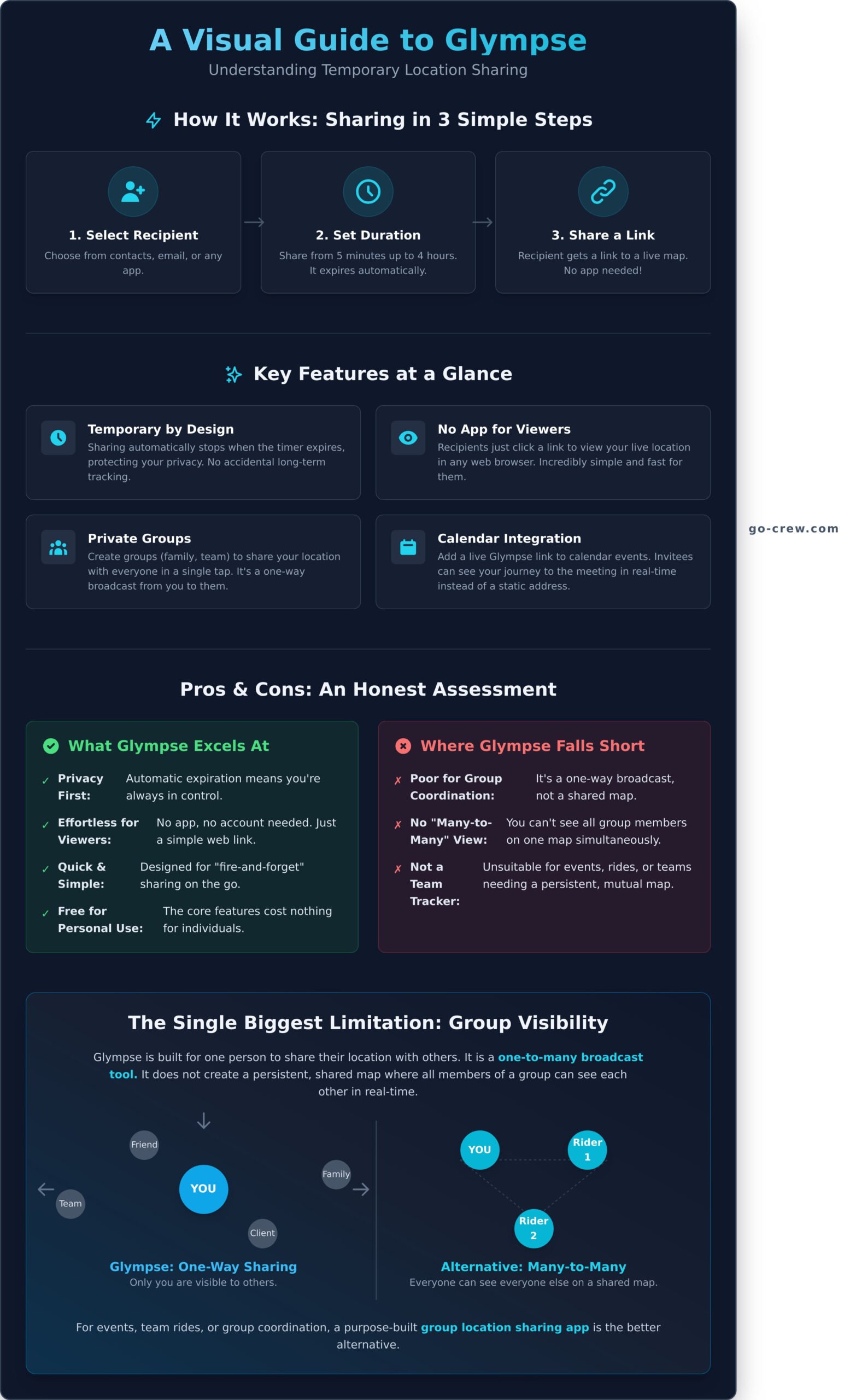
- Select a recipient: You can choose a contact from your phone, enter a number or email, or select a recent contact.
- Set a duration: This is the key to its privacy-focused design. You decide how long your location will be visible, from five minutes up to four hours. The share automatically expires when the timer runs out.
- Share the link: The app generates a unique link that you can send via any platform-SMS, WhatsApp, Messenger, email, or Slack.
The recipient just clicks the link to open a dynamic map in their web browser. They will see your icon moving in real-time, your speed, and your ETA if you’ve set a destination. No app download is required for the viewer, making it a frictionless experience.
Glympse Private Groups
For recurring shares with the same set of people, the Private Groups feature is a major time-saver. You can create a group for your family, your cycling club, or a team of coworkers. Once the group is set up, you can send your location to everyone in it with a single tap instead of selecting them one by one.
It’s important to understand that this is a broadcast tool. When you share with a group, they see your location. It does not create a persistent, shared map where all members can see each other simultaneously. It’s for one-to-many sharing, not many-to-many tracking.
Key Glympse Features: A Deep Dive
At its core, Glympse strips location sharing down to its essentials: sending a temporary, live link of your journey to anyone you choose. There are no permanent profiles or friend lists to manage. This focus on simplicity and privacy makes it a fast and efficient tool for everyday coordination. Viewers don’t even need the app-just a web browser.
The entire system is built for temporary, “on-the-go” use cases. Let’s explore the specific features that make this possible.
Location Requests and ETA
The app’s main function is sending or requesting a “Glympse.” You can share your real-time location with anyone for a set period, from a few minutes up to four hours. Once the timer expires, your location sharing automatically stops. This temporary-by-design approach is a key feature, addressing common concerns around the safety of location sharing by preventing accidental, long-term tracking. The built-in ETA is incredibly practical for everyday situations like:
- Coordinating airport or school pickups.
- Letting friends know you’re running late for dinner.
- Showing a client your exact arrival time for an appointment.
Glympse Premium: Tags and Shares for Business
While the core app is free for personal use, Glympse also offers paid tiers aimed at commercial users. These features are designed for organizations, not the average person sharing their ETA with a friend.
- Premium Tags: This allows a business or event to create a public, branded map. It’s ideal for food trucks, parade routes, or community races where you want a public audience to track multiple participants in real-time.
- Premium Shares: A tool for small businesses to send branded ETAs to customers. A delivery service or field technician can send a professional link that shows their live location and arrival time on a company-branded map.
Calendar and App Integration
This is where the app’s practicality really stands out for busy professionals and families. You can add a dynamic Glympse link directly to a calendar event (like in Google Calendar or Outlook). Instead of a static address, invitees get a live map showing your journey to the meeting point. It integrates smoothly with any messaging app-SMS, WhatsApp, Messenger-for sharing the link. For anyone tired of the endless “where are you?” texts before a meetup, this simple integration is a game-changer.
Glympse Pros and Cons: An Honest Assessment
No app is perfect, and Glympse is a classic example of a tool that excels at its original mission but struggles to adapt to new demands. It pioneered simple, temporary location sharing, and for that, it deserves credit. However, its strengths in one-to-one sharing are precisely what create its weaknesses for dynamic group activities. Here’s a fast, no-fluff breakdown of what works and what doesn’t.
What We Like About Glympse (Pros)
The app became popular for good reason. Its core design is built around simplicity and user control, which remains its biggest advantage for specific, everyday tasks.
- Excellent for Privacy: This is the killer feature. Links expire automatically based on a timer you set. You share your location for 15 minutes, and after that, the link is dead. No creepy, permanent tracking. You have total control.
- Incredibly Simple for ETAs: For the simple task of telling one person, “I’m on my way,” it’s hard to beat. A few taps, send the link, and you’re done. No complex setup, no accounts needed for the viewer.
- No App Required for Viewers: Your friend, family member, or client doesn’t need to download anything. They get a standard web link that opens in any browser, on any device. It’s a completely frictionless experience for the recipient.
- Free for Personal Use: The basic, most common features won’t cost you a dime. For occasional, one-off location sharing, the free version of Glympse gets the job done without hassle.
Where Glympse Falls Short (Cons)
While great for simple ETAs, the app’s limitations become obvious when you try to use it for anything more complex, especially coordinating groups in real-time.
- Not Built for Group Tracking: This is the deal-breaker for any coordinated event. Trying to track a cycling club, a car convoy, or find friends at a festival is a frustrating experience. It’s simply not designed for real-time, multi-user visibility on a single map. For dedicated group activities, solutions like Go Crew are built specifically to solve this problem.
- Requires Constant Re-Sharing: Because every link has a short, mandatory time limit, it’s impractical for ongoing events. On a day-long road trip or group ride, you’d have to constantly send new links to everyone, which is a major distraction.
- Dated User Interface: The app is functional, but its design looks and feels a step behind modern applications. It lacks the polish and intuitive flow that users now expect.
- Confusing Premium Features: Glympse does offer premium features, but they are clearly aimed at businesses and come with a confusing, costly subscription model that doesn’t make sense for personal or small group use.
The Best Glympse Alternative for Groups: Meet Go Crew
While Glympse excels at simple, one-to-one location sharing, its temporary, link-based system falls short when coordinating dynamic groups. If you’ve ever tried to manage a convoy, cycling club, or festival crew with expiring links, you know the frustration. You need a tool built for the group, not just the individual. That tool is Go Crew.
Go Crew was designed from the ground up for one purpose: fast, easy, and real-time group location sharing. It ditches the temporary approach for a more robust and practical solution that saves you time and keeps everyone in sync.
Persistent Groups, Not Temporary Links
The core difference is how groups are managed. With Go Crew, you create a “Crew” once. Members join, and their location is visible to the group whenever they are active. There’s no need to constantly create and share new links for every event. It’s a ‘set it and forget it’ system that provides ongoing visibility for your team, club, or friends.
Built for Action: Real-Time Speed and Heading
Active groups need more than just a dot on a map. Go Crew provides critical data that glympse lacks, including live speed and direction of travel. This is essential for motorsports events, road trip convoys, or cycling groups where knowing if the leader is accelerating or which direction they turned is crucial for staying coordinated. The interface is designed for at-a-glance awareness, so you can focus on the action.
Go Crew vs. Glympse: A Head-to-Head Comparison
When it comes to group tracking, the difference is clear. Here’s a simple breakdown:
| Best Use Case | Dynamic Group Coordination | One-to-One ETA Sharing |
| Group Type | Persistent (Clubs, Teams, Events) | Temporary (One-off Meetings) |
| Setup | Create a Crew Once | Send New Link Every Time |
| Key Data | Location, Speed, Heading | Location, ETA |
For any scenario that involves more than two people in motion, Go Crew is the undeniable winner. It’s built for simplicity and speed, ensuring your group stays perfectly in sync without the constant interruptions of other apps. See why Go Crew is the top choice for group tracking.
The Verdict: Is Glympse the Right GPS Tracker for You?
In the end, our review shows that Glympse serves its purpose well for quick, one-to-one location sharing. It’s a handy tool for letting a single person know your ETA. However, when it comes to coordinating an entire crew-whether on a road trip, a bike ride, or at a festival-the constant need to share and manage individual links reveals its limitations. True group coordination requires a more integrated and real-time solution.
This is where Go Crew shifts into high gear. Built from the ground up for groups, its core mission is TIME-SAVING & SIMPLICITY. Forget the hassle; see your entire team, including their speed and heading, on one live map. It’s designed for dynamic activities, from scenic road trips to fast-paced race tracks, ensuring everyone stays connected effortlessly.
Tired of sending links? Download Go Crew for simple, real-time group tracking! Stop coordinating and start experiencing your adventure together.
Frequently Asked Questions About Glympse
Is the Glympse app free to use?
Yes, the Glympse app is completely free to download and use for its core location-sharing features. You can send a Glympse to anyone without a subscription or hidden fees. The app is available on both the Apple App Store for iOS devices and the Google Play Store for Android. This makes it an accessible and cost-effective tool for anyone needing to share their location temporarily with friends, family, or colleagues.
Can people track me on Glympse without my permission?
No, it is impossible for someone to track you without your explicit consent. Location sharing on Glympse is always initiated by you. You must actively choose to send a “Glympse” link to a specific person or group. Furthermore, every share has a built-in timer that you set, so the link automatically expires after a certain period. You are always in complete control of who sees your location and for how long.
Does Glympse use a lot of battery?
Like any app that uses GPS, Glympse will consume more battery than a standard app, but only while you are actively sharing your location. The app is designed to be as efficient as possible. Since sharing is temporary and expires automatically, the battery drain stops once your Glympse ends. For most users sharing their ETA for short trips, the impact on battery life is minimal and manageable compared to always-on tracking services.
Do you need the Glympse app to view a location?
No, the recipient does not need to have the app installed. This is one of Glympse’s best features. When you send a Glympse, the person receives a unique web link via text, email, or another messaging app. They can simply click this link to view your real-time location on a map in any web browser on their phone, tablet, or computer. This makes viewing your location incredibly simple and convenient for the other person.
What is the main difference between Glympse and Go Crew?
The key difference lies in their primary purpose. Glympse is designed for simple, temporary, one-to-one or one-to-many location sharing-perfect for letting someone know your ETA. Go Crew, on the other hand, is built specifically for real-time group coordination during events like motorsports, cycling, or festivals. It focuses on allowing an entire group or “crew” to see each other’s live locations on a single map to stay connected during a shared activity.
How do I stop sharing my location on Glympse?
You can stop sharing your location in two easy ways. First, every Glympse you send has a timer, and it will automatically stop sharing once that time runs out. Second, if you want to end it early, just open the app and tap on the active Glympse you are sharing. You will see an option to modify the duration or expire the share immediately. This gives you full control to end the location broadcast at any moment.
