


That heart-stopping moment of panic. You’re leaving the stadium, a massive shopping center, or an unfamiliar city block, and it hits you: you have absolutely no idea where you parked. Was it section C or D? Level 2 or 3? The aimless wandering and frantic key-fob clicking begins, wasting precious time and energy.
Stop the search. There’s a better, faster way. Your smartphone is the ultimate tool to find my car in seconds, giving you instant peace of mind. This is all about time-saving and simplicity. No more second-guessing or feeling stranded in a concrete jungle. It’s time for a simple, real-time solution that gets you on your way.
We’re breaking down the five easiest methods to locate your parked vehicle instantly. From the powerful map features already built into your phone to advanced location-sharing tools, you’ll get a reliable system that works every single time. Get ready to pinpoint your car and get walking directions in just a few taps. It couldn’t be easier.
Key Takeaways
- Check your phone’s map settings first. You might already have an automatic car locator without downloading anything new.
- Discover how a simple one-tap action in the right app can help you find my car instantly in crowded lots or unfamiliar areas.
- Understand the key pros and cons of single-purpose apps versus more versatile, multi-purpose location-sharing platforms.
- For ultimate security beyond just parking, learn when a physical GPS tracker is a smarter investment than a phone-based solution.
The Built-in Car Finders on Your Phone (You Might Already Have Them)
Before you download a new app, check your pocket. Your smartphone is already a powerful tool to find my car, using features built right into its operating system. It’s the fastest, simplest, and most cost-effective first step to try when you’ve lost your vehicle.
This works by using your phone’s GPS and its Bluetooth connection to your car. When you park and turn off the engine, your phone senses the Bluetooth disconnection and automatically drops a pin at your last known location. This is a personal, simplified version of a commercial vehicle tracking system, and it requires zero extra effort once it’s set up.
See just how simple this is on an iPhone with this quick video:
For iPhone Users: Using Apple Maps to Find Your Car
Apple Maps has a built-in ‘Show Parked Location’ feature that does the work for you. Once enabled, it automatically marks your car’s spot when your iPhone disconnects from your car’s Bluetooth or CarPlay system. No manual pinning needed. To get back, just open Maps, find the ‘Parked Car’ pin, and tap for walking directions.
To turn it on:
- Go to Settings > Maps.
- Scroll down to the YOUR CAR section.
- Toggle on Show Parked Location.
For Android Users: Google Maps’ Automatic Parking Detection
Google Maps offers a similar hands-free solution. It uses your device’s location data to guess where you parked. For even better accuracy, you can manually save your spot with a single tap. This is the go-to native Android feature to help you find your car in a crowded lot.
To manually save your spot for best results:
- Open Google Maps and tap the blue dot showing your current location.
- Select Save parking from the menu.
- You can then tap the pin to add notes (like ‘Level 3, near the red pillar’) or even a photo of your spot to make finding it even easier.
Using Dedicated ‘Find My Car’ Apps: Pros and Cons
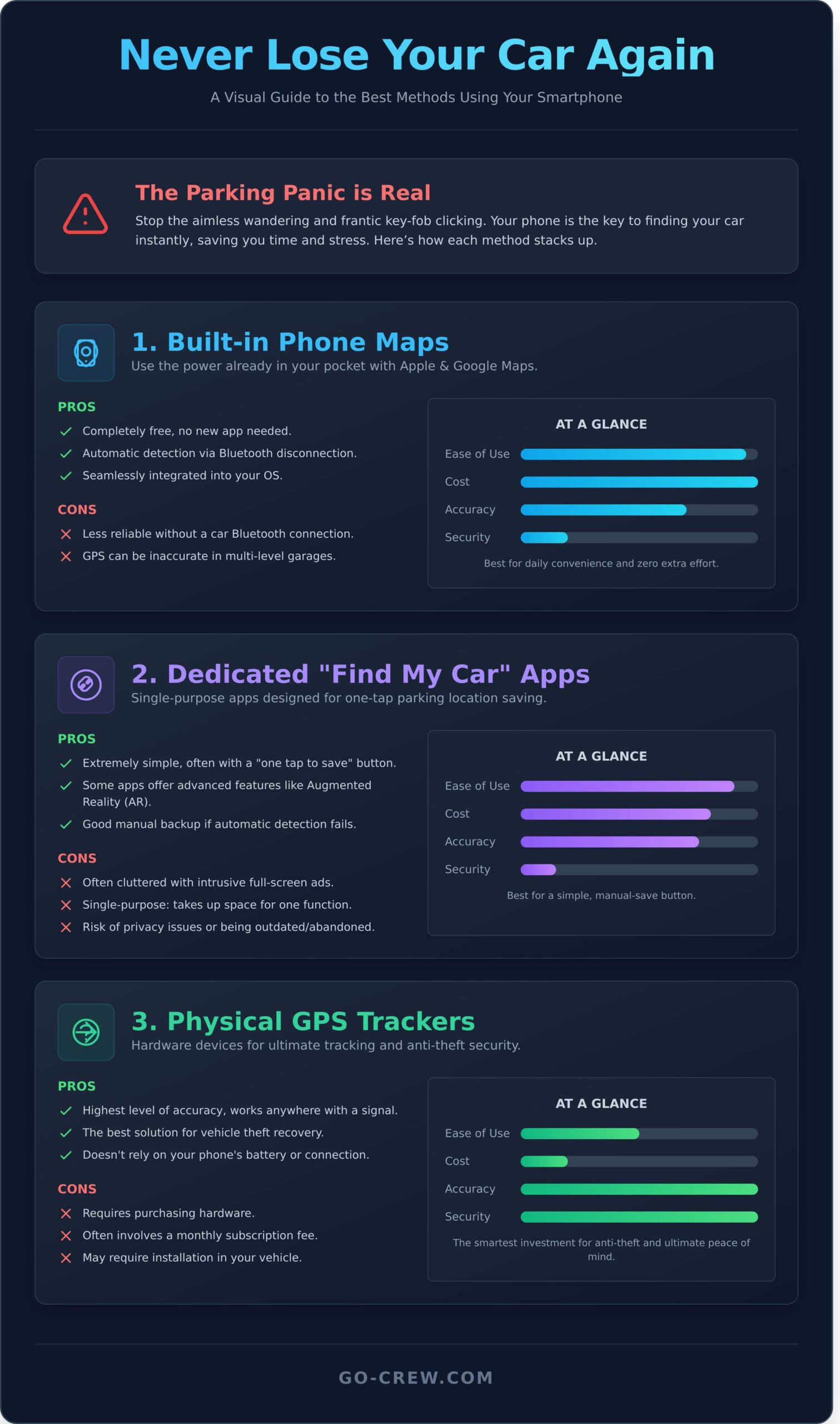
While your phone’s built-in maps are powerful, sometimes a specialized tool is faster. Dedicated find my car apps are built for one job: saving your parking spot instantly. Their main advantage is simplicity. Most offer a ‘one-tap’ button to drop a pin, letting you park and go without a second thought. This makes them a solid backup if your phone’s automatic parking detection is unreliable or you just want a no-fuss solution.
However, a dedicated app isn’t always the perfect answer. They exist in a crowded marketplace, and quality varies wildly. Before you download, it’s crucial to weigh the benefits against the potential drawbacks.
Key Features to Look For
If you decide to go with a dedicated app, focus on what matters. Look for a tool that saves you time, not one that creates new problems. Here’s a quick checklist:
- GPS Accuracy: The app is useless if it can’t pinpoint your location. Check recent reviews for user feedback on precision, especially in large, multi-level parking garages.
- Simplicity: The goal is speed. The best apps let you save your location in a single tap. If you have to navigate through multiple menus, it defeats the purpose.
- Augmented Reality (AR): Some advanced apps use your camera to overlay a walking direction or a pin on the real world, making it incredibly easy to spot your car in a crowded lot.
- Low Battery Usage: A car finder app shouldn’t drain your phone. Look for apps optimized to run efficiently in the background without consuming excessive power.
Potential Downsides to Consider
Free apps often come with hidden costs. Be aware of the trade-offs before committing space on your phone to a single-purpose tool.
- Intrusive Ads: Many free apps are supported by aggressive, full-screen video ads that can be frustrating when you’re in a hurry to find your car.
- Single-Purpose: This app will do one thing and one thing only. It takes up storage and adds another icon to your screen for a function you might only use occasionally.
- Privacy Concerns: Be cautious. Before installing, check what permissions the app requests. A simple parking app shouldn’t need access to your contacts or microphone.
- Outdated Apps: The app store is filled with abandoned projects. Check the “Last Updated” date. An app that hasn’t been updated in over a year may not work well with your current operating system.
A Smarter Way: Using Multi-Purpose Location-Sharing Apps
Why download a single-function app just to solve one problem? While dedicated car-finder apps exist, they offer a narrow solution. A smarter approach is to use a multi-purpose location-sharing app. These tools are engineered for high-accuracy, real-time tracking, giving you far more power and flexibility. Instead of just solving one problem, you gain a tool for countless scenarios.
This method transforms the simple need to find my car into an opportunity for better coordination in your daily life. You get a powerful app for finding friends at a festival, tracking your group on a bike ride, or coordinating a family meetup-all while solving the parking lot problem with superior technology.
How It Works: Pinpointing Your Car with a Live Map
The process is incredibly simple. When you park, just open the app and drop a pin or start sharing your location from your phone. For even more power, you can leave a secondary phone in the car. Share its live location with a partner or family member so they can find the car without you. This real-time tracking is perfect for keeping an eye on your car during valet parking or when a family member borrows it for the day.
Example in Action: Using Go Crew to Find Your Car
Go Crew is a real-time group location sharing app built for speed and simplicity, making it the perfect tool for this job. It couldn’t be easier.
- Create a ‘Crew’: You can create a private crew with just yourself to serve as your personal car locator.
- Drop a Pin: When you park, simply drop a pin in your crew. You’ll have an exact, saved location to navigate back to.
- Share Live: Alternatively, share your location with your family ‘crew’ so everyone can see where the car is, in real-time.
Ready to see how easy it is? Download Go Crew for free and never waste time in a parking lot again.
Beyond Apps: When to Consider Physical GPS Trackers
Smartphone apps are fantastic for daily convenience. But for ultimate security and peace of mind, a physical device dedicated to tracking your vehicle is unbeatable. These trackers are less about finding your spot in a crowded mall lot and more about serious anti-theft protection. The key advantage? They operate independently, so you’re never limited by your phone’s battery life or cellular connection.
When you need more than a simple parking reminder, two main types of hardware enter the picture.
Bluetooth Trackers (like AirTag or Tile)
These small, affordable tags are the definition of “set it and forget it.” Just toss one in your glove box or under a seat, and you’re done. They don’t use GPS themselves; instead, they leverage a secure, crowd-sourced network. The tracker pings nearby phones in its network (like Apple’s Find My network), which then privately relay its location back to you. It’s a brilliant system for short-range locating, like confirming which section of the airport garage you parked in.
- Pros: Extremely low cost, long battery life (a year or more), simple setup.
- Cons: Limited effective range, dependent on other people’s devices being nearby.
Dedicated GPS Car Trackers
When you need a true, real-time find my car solution for security, this is the professional-grade option. These units plug directly into your car’s OBD-II port (the same one mechanics use) or are hardwired to the battery for constant power. They use actual satellite GPS technology to provide a highly accurate, live location that you can view on a dedicated app. This is the tool of choice for theft recovery, often including features like geofencing alerts that notify you the moment your car moves without your permission.
- Pros: Pinpoint accuracy, always powered on, advanced security features.
- Cons: Higher hardware cost and almost always requires a monthly subscription fee.
Ultimately, the right tool depends on your primary goal. For the daily “where did I park?” moment, the apps we’ve discussed are fast and effective. But if your main concern is protecting your investment from theft, a dedicated GPS unit offers a level of security that software alone can’t match.
Stop Searching, Start Driving: The Ultimate Car Finder Solution
Navigating the world of car-finding technology can seem complex. We’ve covered everything from your phone’s built-in maps to dedicated GPS hardware. While these tools can certainly work in a pinch, they often offer just one piece of the puzzle. The smartest solution is one that integrates seamlessly into your life, saving you precious time and eliminating the daily frustration of a lost vehicle for good.
So, why settle for a single-purpose app when you need a fast, reliable way to find my car that also connects your world? Go Crew is engineered around a core of TIME-SAVING & SIMPLICITY, delivering pinpoint-accurate, real-time GPS tracking when you need it most. It’s more than a car finder-it’s a dynamic tool to share your location with friends, family, or your entire event crew. Group location sharing couldn’t be easier.
Ready to make parking stress a thing of the past? Download Go Crew for free and never lose your car-or your crew-again. It’s time to get back to what matters most: the adventure ahead.
Frequently Asked Questions
Do ‘find my car’ apps drain your phone’s battery?
Not really. Modern apps are smart and optimized for low battery usage. They don’t track you constantly. Instead, the app uses GPS for a brief moment to log your car’s location when you park. It only uses it again when you open the app to find your way back. This efficient process means you get the help you need without a significant impact on your phone’s battery life. Simple and effective.
How accurate are GPS-based car finder apps?
They are surprisingly accurate. In open areas like large parking lots, most GPS-based apps can pinpoint your car’s location within 5 to 10 meters (about 15-30 feet). While tall buildings or dense urban areas can sometimes slightly affect precision, the app will still get you close enough to spot your vehicle easily. Forgetting where you parked is no longer a problem; the accuracy is more than enough to guide you straight to your car.
What if I park in an underground garage with no GPS signal?
No signal? No problem. The best apps have you covered. When GPS is unavailable, they allow you to manually add helpful details. You can drop a pin on the garage entrance and add a text note like “Level P3, Row C, Spot 34.” Many even let you snap a quick photo of your parking space or a nearby sign. This simple, manual backup ensures you can find your car even when you’re deep underground.
Are free ‘find my car’ apps safe to use? What about my privacy?
Yes, but stick to reputable options. The safest free apps are from well-known developers on the official Google Play or Apple App Store. Always check an app’s permissions before installing it. A quality app will only request location access to perform its main function and won’t sell your personal data. Your privacy is protected when you choose trusted, highly-rated applications designed with the user in mind.
Can I use these apps to find my car if it gets stolen?
These apps are not designed for theft recovery. A typical find my car app simply saves the last location where you parked. It doesn’t provide live, real-time tracking of a moving vehicle. If your car is stolen, the saved location won’t be accurate anymore. For vehicle theft, you need a dedicated, hardwired GPS tracking service and should contact law enforcement immediately. Use these apps for parking, not for security.
Apple Maps vs. Google Maps: Which is better for finding my parked car?
Both are excellent, but your choice depends on your device and habits. Apple Maps is seamless for iPhone users, often automatically saving your car’s location when you disconnect from CarPlay or Bluetooth. Google Maps requires you to manually tap the blue dot and select “Save your parking,” but this feature is powerful and works great on both Android and iOS. For a simple parked car function, either one gets the job done fast.
