


The festival bass is dropping, your favorite band is about to start, and your friends are… somewhere. The endless ‘where are you?’ texts are killing the vibe and your battery. Sound familiar? Losing your crew in a crowd or on a group ride is a classic headache that can turn an epic day into a frustrating search mission. What if you could skip the chaos and instantly see friends location on map in real-time? No more guessing games, just a simple, fast way to find your people.
It’s not complicated tech wizardry, and it doesn’t have to be a privacy nightmare. Getting your group back together should be easy, and we’re here to show you exactly how. This 2026 guide cuts straight to the chase. We’ll break down the fastest ways to use your phone’s built-in tools like Google and Apple Maps for simple meetups. Then, we’ll show you when a dedicated group location sharing app is the smarter, safer choice for high-energy activities. Get ready to sync up your crew and spend less time searching and more time enjoying the moment.
Key Takeaways
- Learn the fastest methods to see friends location on map using your phone’s built-in tools like Google Maps and Apple’s Find My.
- Understand the key limitations of basic map apps and know exactly when your group needs a more powerful, dedicated solution.
- Discover the essential features to look for in a group location sharing app to ensure it’s fast, reliable, and simple for your crew.
- Get simple, actionable rules for sharing your location safely and privately, giving you total peace of mind during any activity.
The Built-in Basics: Using Your Phone’s Native Map Apps
Before you download a new app, look at the powerful tools already on your phone. For a quick, simple way to see friends location on map, your device’s native apps are the fastest solution. They are perfect for meeting up with one person or letting a family member know you’re on your way home safely.
Both Google and Apple provide robust, free, and secure location-sharing features built right into their operating systems. These apps use a combination of GPS, Wi-Fi, and cellular data to pinpoint a device’s position with surprising accuracy. If you’re curious about the technology, you can learn more about how mobile phone tracking works to understand what’s happening under the hood.
To see this in action, here’s a quick guide on using Google Maps for location sharing:
For Android & iPhone Users: Google Maps Location Sharing
Google Maps is universal, working seamlessly across both Android and iPhone devices. It’s user-friendly and gets the job done in seconds. Just follow these simple steps:
- Open Google Maps and tap your profile picture in the top-right corner.
- Select ‘Location sharing’ from the menu, then tap ‘New share’.
- Choose how long to share your location-from one hour to ‘Until you turn this off’.
- Select one or more friends from your contacts to send an invitation. They’ll get a notification and can see your real-time position on their map.
For iPhone Users: The ‘Find My’ App
If you and your friends are all in the Apple ecosystem, the ‘Find My’ app is a streamlined and deeply integrated option. It’s simple, secure, and already installed on your iPhone.
- Open the pre-installed ‘Find My’ app and tap the ‘People’ tab at the bottom.
- Tap the ‘+’ button and choose ‘Share My Location’.
- In the ‘To:’ field, enter the name or phone number of the friend you want to share with.
- Choose to share for one hour, until the end of the day, or indefinitely. Tap ‘Send’ and you’re done.
When Built-in Tools Aren’t Enough for Your Crew
The standard location sharing features on your phone are perfect for a simple task: letting one friend know where you are. But when you’re managing a dynamic group on the move-a motorcycle convoy, a cycling team, or friends navigating a crowded festival-these basic tools quickly hit their limits. What you need is more than just a pin on a map; you need a command center for your crew. The frustration of juggling multiple chats and outdated locations is exactly why specialized group-sharing apps were born.
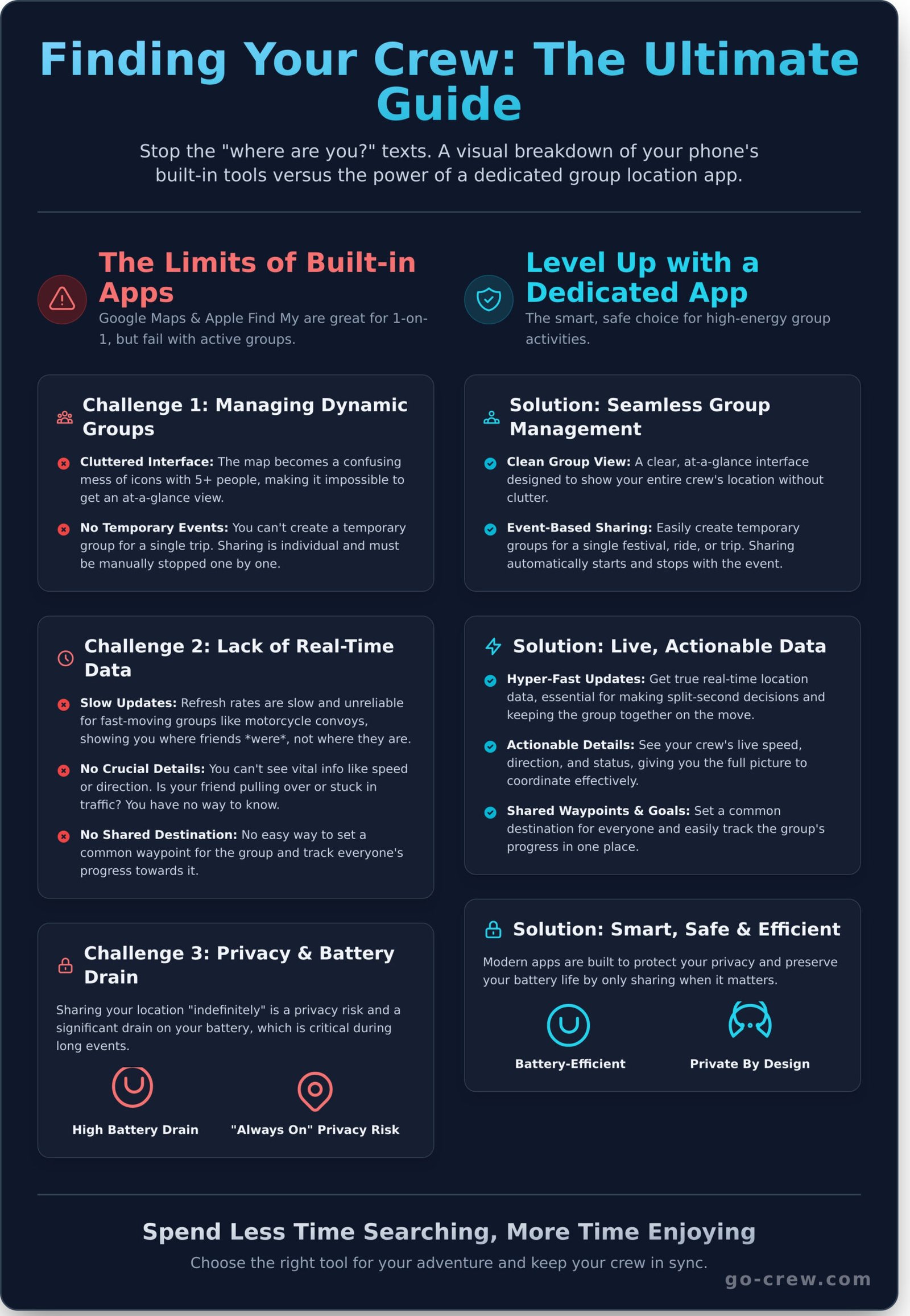
Challenge 1: Managing a Dynamic Group
Trying to coordinate more than two or three people with built-in apps is clumsy and inefficient. The experience isn’t designed for groups. As your crew grows, the problems multiply, making it nearly impossible to easily see friends location on map in a clear, organized way.
- Cluttered Interface: With five or more friends, the map becomes a confusing mess of icons and names. There’s no clean, at-a-glance view of your entire group.
- No Temporary Events: You can’t create a temporary group for a single event, like a day-long road trip. You’re forced to share locations individually and then remember to manually stop sharing with everyone later.
- Difficult Management: Adding or removing people from a “group” is a hassle, requiring each person to manage their sharing settings individually.
Challenge 2: Lack of Real-Time, Actionable Data
A static dot on a map tells you where someone was, not where they’re going. For fast-moving activities, this delay is a deal-breaker. You need live, actionable information to make split-second decisions and keep the group together.
- Slow Updates: The refresh rate on basic apps can be slow, showing you outdated information. That’s not helpful when you’re trying to catch up on the highway.
- No Crucial Details: You can’t see vital data like a friend’s speed or direction of travel. Are they pulling over or just stuck in traffic? You have no way of knowing.
- No Shared Destination: There is no simple way to set a common waypoint for the entire group and track everyone’s progress toward it in one place.
Challenge 3: Privacy and Battery Concerns
Constant location sharing has serious downsides that basic tools aren’t built to handle efficiently. It’s easy to share your location “for one hour” and accidentally leave it on indefinitely, creating a significant privacy risk. Forgetting to manage these settings is a common problem, which is why reviewing expert location sharing safety tips is so important for any user.
- “Always On” Dangers: Forgetting to turn off location sharing after an event means you could be broadcasting your location 24/7 to people you only met for a day.
- Serious Battery Drain: Maintaining a constant GPS connection with multiple individuals is a massive power hog. Your phone will likely die long before your event is over.
- Poor Optimization: These features are not optimized for the demands of a long-duration group event, leading to both performance issues and a drained battery.
Level Up: The Power of Dedicated Group Location Sharing Apps
While your phone’s built-in map or messaging app can share a location, they often fall short for dynamic groups. Setting up sharing with multiple people can be clunky, and managing temporary events is a hassle. This is where dedicated group location sharing apps shine. They are built from the ground up for one purpose: to help you see friends location on map quickly and without any friction, especially when time is critical.
These specialized tools solve the limitations of generic apps by focusing on three core benefits: simplicity, speed, and powerful group management for real-world activities.
Effortless Group Management
Forget scrolling through contacts or creating permanent sharing circles for a one-off event. The best dedicated apps are designed for temporary, on-the-fly coordination. They allow you to:
- Create a temporary ‘crew’ or group for a specific activity in seconds.
- Invite anyone with a simple, shareable link-they don’t even need to be in your phone’s contacts.
- Stop worrying about privacy; the group and its data automatically dissolve when the event is over.
It’s set up, share, and go. Simple as that.
More Than Just a Location
True group tracking is about more than just a pin on a map. These apps provide a command-center view of your entire crew in true real-time. You don’t just see where they are; you see crucial context like their current speed, heading, and even their phone’s battery level. This is a game-changer for coordinating motorsports, keeping track of cyclists on a trail, or regrouping with skiers on the mountain.
Introducing Go Crew: Built for Time-Saving & Simplicity
Go Crew is a prime example of an app designed to get out of your way. The entire experience is engineered around getting your group set up and tracking in under a minute. It’s built for activities where speed and coordination are everything-from road trips and cycling convoys to just meeting up downtown.
Stop wasting time with complicated setups. Start tracking your crew instantly.
See how Go Crew makes group tracking easy.
What to Look For in a Location Sharing App
When you want to see your friends’ location on a map, grabbing the first app you find isn’t the best move. They are not all created equal. Some are slow, some drain your battery, and others play fast and loose with your privacy. A great group location sharing app should be fast, simple, and reliable-making your life easier, not more complicated.
To find the right fit, focus on the core features that truly matter for group activities. Use this checklist to evaluate your options and ensure the app you choose delivers a seamless experience designed for action.
Core Feature: True Real-Time Tracking
This is non-negotiable. Look for an app with a high refresh rate that shows smooth, live movement-not a static pin that jumps every few minutes. For dynamic events like a convoy, bike ride, or navigating a festival, delayed updates are useless. You need to see exactly where everyone is, right now. Anything less is just a glorified map marker.
Core Feature: Battery Efficiency
A location sharing app is worthless if it kills your phone’s battery in a couple of hours. A well-designed app is optimized to minimize power consumption, allowing you to share your location all day without worry. Check app store reviews for comments on battery drain. Apps built specifically for events understand that your phone needs to last from start to finish.
Core Feature: Privacy and Control
You should always be in complete control of your data. The best apps make it easy to start and stop sharing with a single tap. Look for features like temporary, shareable links that don’t require friends to create accounts. Be cautious of apps that demand excessive permissions-if it needs access to your contacts and microphone just to share a location, it’s a red flag.
Finding an app that ticks all these boxes-real-time speed, all-day battery, and user-controlled privacy-is the key to a stress-free experience. When you can reliably see friends location on a map without interruptions, you save time and can focus on the event itself. Platforms like Go Crew are built around these core principles, delivering a simple and powerful tool for any group activity.
Best Practices for Sharing Your Location Safely
The power to see friends location on a map in real-time is a game-changer for coordinating meetups and staying connected. But with great power comes great responsibility. Your privacy and safety are priority one. These simple, actionable rules will empower you to share your location with confidence and control.
Rule 1: Share With Your Trusted Crew Only
Think of your location as sensitive data-because it is. The golden rule is simple: only share your location with people you know and trust in real life. Avoid posting public sharing links on social media or forums where anyone can access them. Keep your circle tight to ensure your location data stays private and secure.
Rule 2: Use Temporary Sharing for Events
Heading to a festival, a group ride, or a party? Temporary sharing is your best friend. Most apps allow you to share for a specific duration, like one hour or until the end of the day. This is perfect for single events and prevents you from accidentally over-sharing. Reserve the ‘share indefinitely’ option for only your most trusted contacts, like immediate family.
Rule 3: Do a Regular Privacy Check-Up
Don’t just set it and forget it. Make it a habit to review who can see your location at least once a month. It only takes a minute and puts you in complete control. Here’s a quick guide:
- In Google Maps: Tap your profile picture, then go to ‘Location sharing’. You’ll see a list of everyone you’re actively sharing with. Remove anyone who no longer needs access.
- In Apple’s Find My: Open the app and go to the ‘People’ tab. Review the list and swipe to remove old contacts or expired shares.
By following these best practices, you can get all the benefits when you need to see friends location on a map without compromising your personal safety. Smart sharing is safe sharing. Modern tools built for group coordination, like Go Crew, are designed with temporary, event-based sharing at their core, giving you simplicity and peace of mind.
Get Your Crew on the Map-The Fast, Easy Way
Staying connected in 2025 is easier than ever. While your phone’s native map apps offer a basic starting point, they often fall short for coordinating dynamic groups. For real-time precision and seamless group management, a dedicated app is the clear winner. Just remember to always prioritize safety and share your location thoughtfully with people you trust.
When you need to see friends location on map without the hassle, you need a tool built for speed and simplicity. Stop juggling clunky apps and confusing settings. Go Crew is designed with one goal: TIME-SAVING & SIMPLICITY. Whether you’re coordinating a ride, tracking a motorsport event, or finding your friends at a festival, you can get your entire crew on the map in under a minute. It’s group location sharing that’s finally as fast and dynamic as your plans.
Ready for group location sharing that’s actually easy? Download Go Crew for free! Spend less time coordinating and more time making memories together.
Frequently Asked Questions: See Your Friends on a Map
Does sharing my location on a map drain my phone battery?
Modern phones and apps are highly optimized. While any app that lets you see friends location on a map uses GPS, the battery drain is minimal. Dedicated apps like Go Crew are built for efficiency, especially for events like festivals or road trips where every bit of power counts. You’ll barely notice the difference in daily use, but you will definitely notice the time saved by not getting lost. It’s a small trade-off for a huge convenience.
Can I see someone’s location without them knowing?
No. All legitimate location sharing apps are built on a foundation of consent and privacy. A person must always accept your request and actively choose to share their location with you. The goal is coordination and safety among friends, not surveillance. Any app or service that claims to track someone without their explicit permission is not secure and should be avoided. Trust and control are key.
Is it safe to use free location sharing apps like Go Crew?
Yes, as long as you choose a reputable app with a clear privacy policy. Safe apps like Go Crew give you full control. You decide who to share with, when to share, and for how long. Your data is not sold, and groups are temporary and private. Always download apps from official sources like the Apple App Store or Google Play Store and check their reviews and permissions before installing.
How accurate is phone GPS for finding friends in a city or at a festival?
It’s surprisingly accurate! Most modern smartphones can pinpoint your location to within a few meters (about 10-15 feet). In a dense city with tall buildings or at a massive festival with network congestion, there might be a slight delay or a small jump. However, it’s more than precise enough to see which street corner, stage, or food truck your friends are near. It makes finding your crew in a crowd incredibly simple.
What’s the main difference between sharing on Google Maps vs. a dedicated app?
The key difference is focus and speed. Google Maps is a complex navigation tool with location sharing as one of many features. A dedicated app like Go Crew is built for one thing: fast, easy, real-time group location sharing. Creating a temporary group for an event is instant, without navigating complex menus. The interface is clean and shows only what you need-your crew on a map. It’s all about time-saving and simplicity.
Can I share my location between an iPhone and an Android phone?
Absolutely. While native tools like Apple’s “Find My” are limited to one ecosystem, most dedicated location sharing apps are designed to be cross-platform. This is their main advantage. Using an app like Go Crew ensures you can connect with your entire group seamlessly, no matter what type of phone anyone has. It breaks down the tech barriers so everyone can stay on the same page, or in this case, the same map.
