


Lost in a sea of location-sharing options? Trying to find the right gps app can feel impossible. The app store is flooded with choices, but they leave you with more questions than answers. Will it drain your battery in an hour? Is your data private? And will it actually work for keeping your motorcycle crew together on a winding road, or is it just another clunky map? The search for a simple, reliable tool quickly becomes a frustrating waste of time.
Forget the guesswork. This is your fast-track guide to choosing the perfect app for your needs. We’re cutting through the noise to break down exactly what matters. You’ll discover the key differences between navigation, tracking, and real-time group sharing apps. We’ll highlight the mission-critical features you can’t live without and expose the ones that are just hype. By the end of this guide, you’ll know how to pick a user-friendly app that keeps your group connected effortlessly, without killing your phone’s battery. Let’s get you on your way. Simple. Fast.
Beyond Navigation: Understanding the Main Types of GPS Apps
When you hear “GPS app,” you probably think of getting from point A to B. But that’s just scratching the surface. The world of location-based apps is massive, and not all are created equal. Their purpose defines their features, and choosing the wrong one leads to frustration. The core technology, the Global Positioning System (GPS), enables a huge variety of functions beyond simple directions.
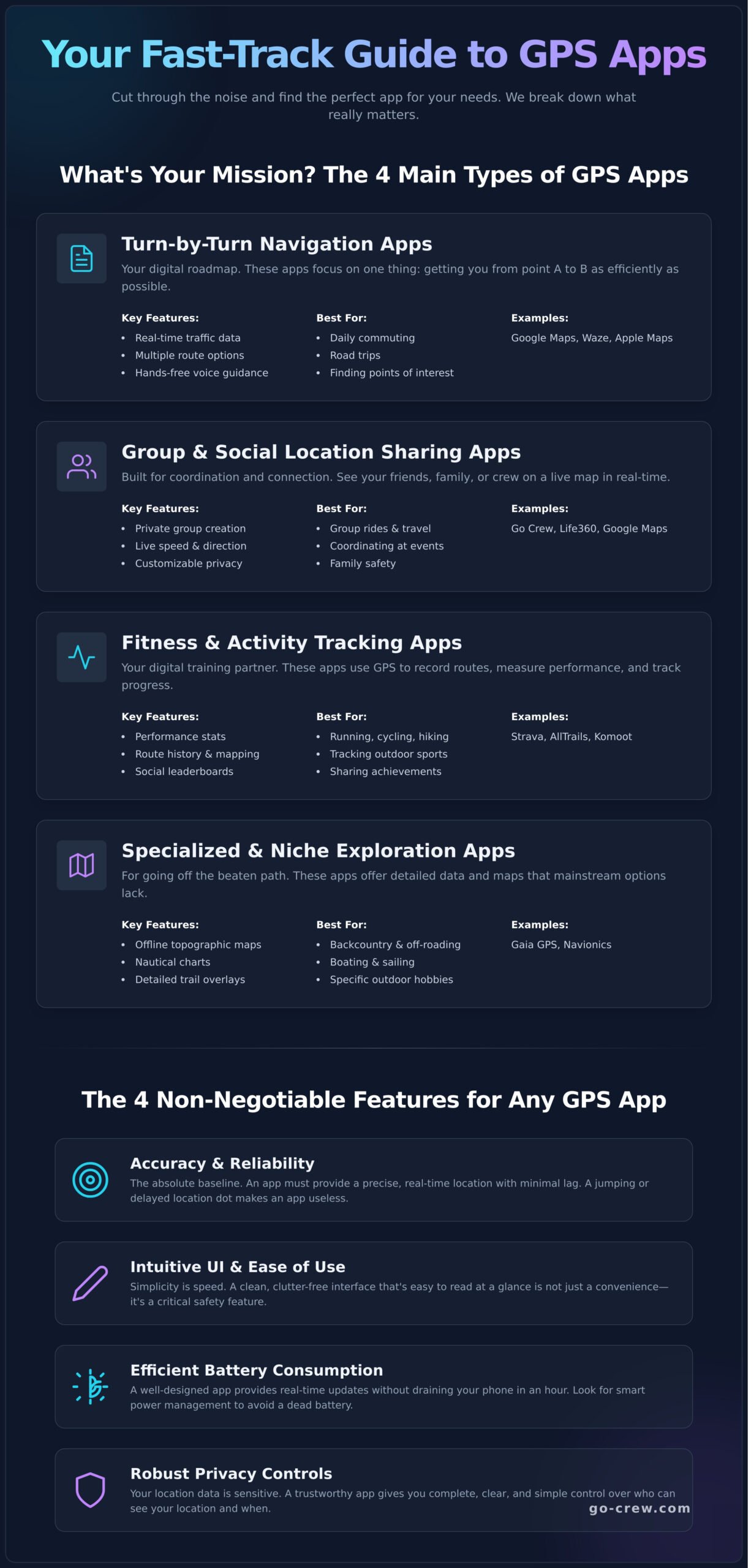
Before you start downloading, ask yourself one simple question: What’s my main goal? Are you trying to find the fastest route to work, meet up with your crew at a festival, or track your weekend bike ride? Pinpointing your primary need is the key to finding the perfect gps app without wasting time. This guide breaks down the four main categories to help you choose wisely.
Turn-by-Turn Navigation Apps
This is the category most people know. These apps are single-minded: get you to your destination as efficiently as possible. They are the digital road maps for your daily life.
- Key Features: Real-time traffic data, multiple route options, and hands-free voice guidance.
- Examples: Google Maps, Waze, Apple Maps.
- Best For: Daily commuting, road trips, and finding any point of interest.
Group & Social Location Sharing Apps
Designed for coordination and connection, these apps let you see your friends, family, or team members on a live map. No more “where are you?” texts. It’s all about real-time group awareness.
- Key Features: Private group creation, live speed and direction tracking, and customizable privacy controls.
- Examples: Go Crew, Life360, Google Maps (location sharing feature).
- Best For: Group rides, coordinating at events, and ensuring family safety.
Fitness & Activity Tracking Apps
For the active and adventurous, these apps are your digital training partners. They use GPS to record your routes, measure performance, and help you push your limits.
- Key Features: Detailed performance stats (speed, distance, elevation), route history, and social leaderboards.
- Examples: Strava, AllTrails, Komoot.
- Best For: Running, cycling, hiking, and tracking any outdoor sport.
Specialized & Niche Exploration Apps
When you go off the beaten path, standard maps just don’t cut it. These specialized apps are built for specific hobbies, offering detailed data that mainstream apps lack.
- Key Features: Offline topographic maps, nautical charts for boating, and detailed trail overlays for 4x4s.
- Examples: Gaia GPS (off-roading/hiking), Navionics (boating).
- Best For: Backcountry exploration, sailing, and other specialized outdoor activities.
The Non-Negotiables: 5 Key Features Every Good GPS App Must Have
Before you get drawn in by fancy add-ons, you need to make sure the basics are covered. These core features are what separate a powerful, reliable tool from a digital headache. A failure in any of these fundamental areas can make an app frustrating, unsafe, or completely useless. Use this as your essential checklist when evaluating any gps app.
-
Accuracy & Reliability
This is the absolute baseline. A gps app must provide your precise location with minimal lag. A dot that jumps around the map or trails 30 seconds behind you is worthless. Look for apps that promise frequent data updates and always check user reviews for honest feedback on GPS signal strength and real-time tracking stability.
-
User Interface (UI) & Ease of Use
Simplicity is speed. When you’re on the move, you need a map that is clean, clutter-free, and easy to read at a glance. Menus and settings should be intuitive, not a complex puzzle. A confusing interface isn’t just an annoyance; it’s a serious safety hazard when you’re driving, riding, or trying to coordinate a group in a hurry.
-
Efficient Battery Consumption
GPS tracking is a notorious battery hog, but a well-designed app knows how to manage power. The best apps use smart technology to provide real-time updates without draining your phone in an hour. Look for features like “battery optimization mode” and check reviews for complaints about excessive battery drain. An app that leaves you with a dead phone is a liability.
-
Robust Privacy Controls
Your location data is personal and sensitive. You must have complete control over who sees it and when. A trustworthy app gives you clear and simple tools, like temporary sharing links, an easy on/off toggle, and transparent permission requests. It is vital that you know how to manage your location privacy settings and understand what the app does with your data. Your security is non-negotiable.
Advanced Features: Level Up Your Tracking Experience
Once you’ve confirmed a GPS app nails the basics, it’s time to look at the extras that can solve specific problems and supercharge your experience. These advanced features aren’t just fluff; they are powerful tools that can transform how you navigate, travel, and connect.
Not everyone needs these, but for some users, they are absolute game-changers. The key is to identify which of these are ‘must-haves’ for your unique situation, whether you’re a daily commuter, an off-road adventurer, or a group event organizer.
Offline Maps & Functionality
Heading into a dead zone? Offline functionality is non-negotiable for travel in areas with poor or no cell service. This feature allows you to download detailed maps of a region directly to your device. Before you commit, verify that the core tracking and navigation tools still work without a data connection, ensuring you’re never truly lost, even when you’re off the grid.
Real-Time Traffic & Alerts
For the daily driver, real-time traffic is the secret sauce that makes a good navigation app indispensable. Using live, crowdsourced data, the app can dynamically find the fastest route, helping you dodge traffic jams and delays. Top-tier apps also provide instant alerts for accidents, road closures, and even speed traps, saving you time and frustration on every trip.
Customizable Group Features
This is where a social gps app truly shines, moving beyond simple dot-watching to genuine group coordination. Look for an app that makes it incredibly easy to manage your crew. Essential features include:
- Effortless Group Creation: Start a group and invite members with a simple, private link.
- Shared Destinations: Set a common waypoint for everyone to navigate toward.
- Real-Time Stats: See the speed, heading, and ETA of every member in your group.
For organizing convoys, group rides, or meetups, a dedicated platform like Go Crew streamlines this process, focusing purely on fast and simple group tracking.
Cross-Platform Integration
Your tracking experience shouldn’t be trapped on one device. Check for seamless integration with other platforms you use daily. Does the app work with Apple CarPlay or Android Auto for safer in-car use? Can you plan a complex route on your desktop computer and instantly send it to your phone? This level of connectivity makes the entire process smoother and more intuitive.
Go Crew: The Simple, Fast Choice for Group Tracking
We’ve covered the essential features to look for in a location tracking tool, but when your goal is coordinating a group, a general-purpose map app often falls short. They’re cluttered with features you don’t need, making a simple task-seeing your crew-slow and complicated. This is where a specialized gps app shines.
Go Crew was built from the ground up on two core principles: TIME-SAVING & SIMPLICITY. It cuts through the noise of bloated applications to deliver exactly what you need for seamless group tracking, without any interruptions. It’s not about adding more features; it’s about perfecting the one that matters most: your crew’s real-time location.
Why Simplicity Wins for Group Coordination
Getting your group on the same page should take seconds, not a 10-minute tutorial. Go Crew’s interface is designed for instant setup and at-a-glance clarity. There’s no digging through complex menus or fighting with confusing settings. Just create a group, share the link, and you’re on the map. It’s group location sharing that’s finally as fast and dynamic as your activities.
Built for Your Activity
Whether you’re organizing a convoy for a car meet, leading a cycling pack, navigating a road trip with friends, or trying to find everyone at a festival, Go Crew is the perfect tool. It provides the critical, real-time data you need, including:
- Live Speed & Heading: See exactly where everyone is and which way they’re moving on a single, clean map.
- Destination Sync: Easily set a meetup point and see who has arrived and who is still on their way.
- Real-Time Updates: The map is live, ensuring you have the most accurate information when you need it most.
The Right Features, Without the Fluff
Go Crew focuses on being the best group tracking gps app by delivering core functionality flawlessly. It’s engineered for low battery drain, so you can keep it running during long rides or all-day events without worry. Forget paying for a dozen features you’ll never use. You can start with the free version to see exactly how Go Crew works for your team.
Ready to stop wasting time and start tracking? Get your crew on the map in minutes. Try Go Crew now!
Get Your Crew on the Map: The Right GPS App Awaits
Choosing a GPS tracking solution comes down to your unique needs. While features like real-time accuracy and reliability are non-negotiable, the best tool is the one that solves your problem without adding complexity. It should save you time and eliminate hassle, especially when coordinating with a group.
When you need to sync up with friends at a festival or track your team on the road, the ideal gps app must be fast and simple. This is where Go Crew excels. It’s built on a foundation of TIME-SAVING & SIMPLICITY, ensuring group location sharing couldn’t be easier. With its Easy | Fast | Real-time interface, you can get everyone on the same map in under a minute.
Stop wasting time with complicated apps. Ready for a simpler way to track your crew? Download Go Crew for free! Get everyone on the same page and focus on what truly matters-the adventure ahead.
Frequently Asked Questions
What is the most accurate GPS app for a phone?
Accuracy depends more on your phone’s hardware than the app itself. Top apps like Google Maps and Waze all pull data from the same GPS satellites. The key difference is how they process that data and handle real-time updates. For activities like group rides or meeting friends, the best app is one that minimizes lag, ensuring the location you see on the map is where your friends are right now, not where they were 30 seconds ago.
Do free GPS apps sell your location data?
It’s a common business model. Many free apps generate revenue by selling anonymized user data to third parties for advertising or market analysis. If an app is free with no other obvious income source, it’s wise to assume your data is being monetized. Always check the privacy policy before granting location access. A trustworthy developer will be transparent about how your information is used, stored, and shared with others.
Can a GPS app work without an internet connection or Wi-Fi?
Yes, but with limitations. Your phone’s GPS chip communicates directly with satellites and doesn’t need internet to find your coordinates. However, the app requires a data connection to download maps and show your position on them in real-time. For off-grid adventures, look for a GPS app that offers offline maps. This allows you to download map sections in advance, so you can still navigate even when you’re completely without a cell signal.
What is the difference between a GPS app and a physical GPS device?
It’s all about convenience versus capability. A GPS app on your phone is perfect for everyday use-it’s always with you and integrates with other phone features. A dedicated physical GPS device, however, is built for more extreme conditions. They typically offer much longer battery life, are more durable and waterproof, and have stronger antennas for maintaining a signal in remote areas where a phone might fail. Your choice depends entirely on your activity.
Which GPS app uses the least amount of battery?
Battery drain is primarily caused by two things: keeping the screen on and the GPS radio running constantly. Therefore, battery usage is more about your habits than the specific app. To save power, dim your screen and only use live tracking when you actively need it. Some apps are better optimized for efficient background tracking, so check for a “battery saver” mode or options to adjust the location update frequency in the settings.
Is it safe to share my location with a GPS app?
Safety depends on the app’s security features and who you are sharing with. Only use reputable apps that give you complete control. Look for features that let you create temporary sharing sessions or private groups, and ensure you can stop sharing your location with a single tap. Most importantly, only share your location with people you know and trust. Never broadcast your real-time position on a public profile or to strangers.
