


“Where are you now?” Stop wasting your day with that one simple question. Managing your small team of 2, 5, or even 10 people shouldn’t require clunky hardware or software designed for a corporate giant. You don’t need a long sales process or a complex installation-you need a simple, fast, and effective fleet management app that runs right on your team’s smartphones. It’s about getting real-time answers without the enterprise-level headache. Time-saving and simplicity are the name of the game.
But with hundreds of options flooding the market, how do you pick the perfect one for 2026? Easy. We’ve cut through the complexity for you. This straightforward checklist is your shortcut to choosing an affordable, user-friendly app that gets you up and running in minutes. Get ready to improve efficiency, provide accurate customer ETAs, and finally know exactly where your team is, all from the palm of your hand. Let’s dive in.
Why Your Small Business Needs a Fleet Management App
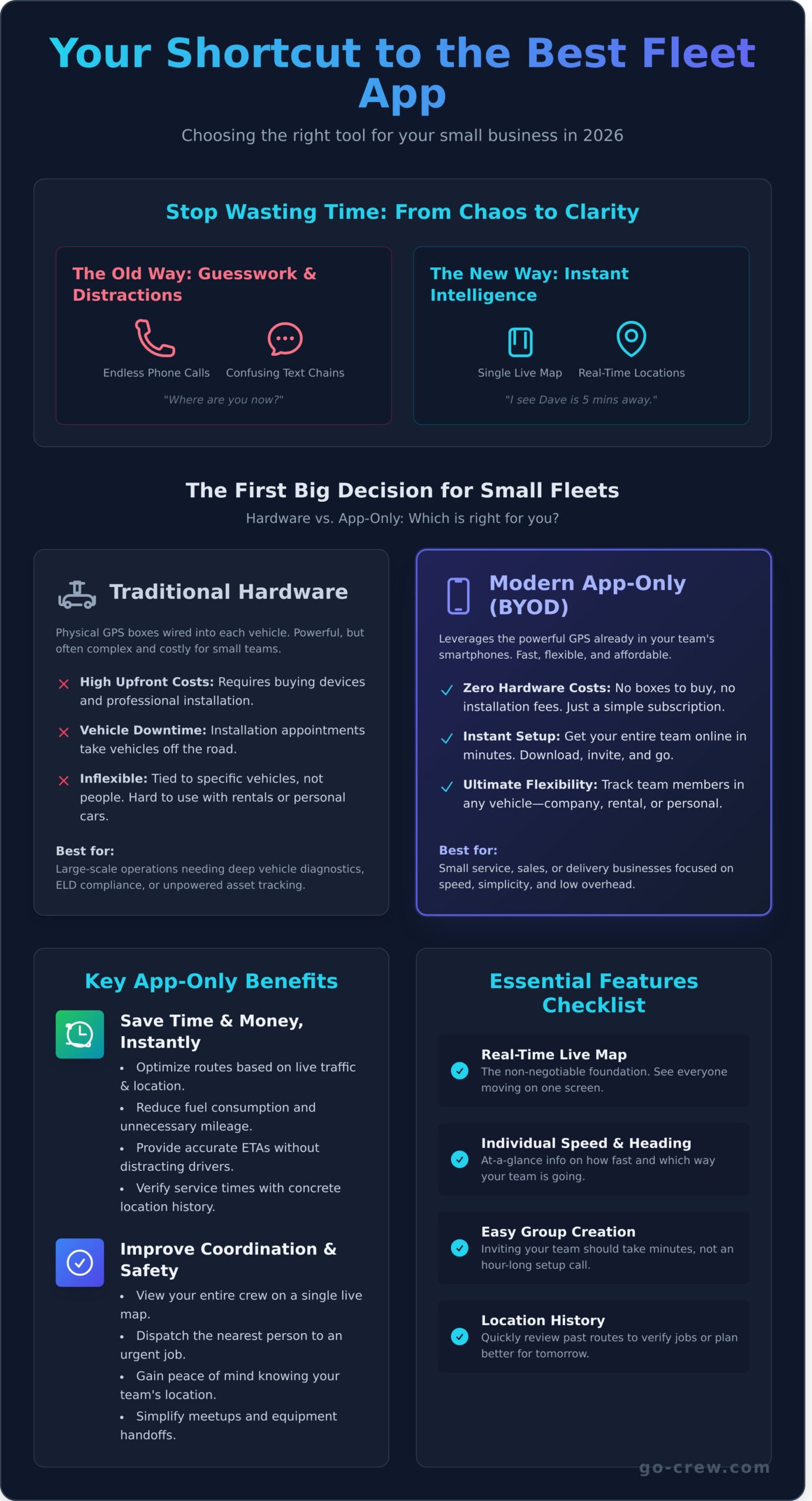
Are you still coordinating your team with endless phone calls, confusing text chains, and manual check-ins? If you manage even a couple of vehicles, you know this chaos costs you time and money. It’s time to upgrade. A modern fleet management app replaces the guesswork with real-time data, giving you a clear view of your entire operation on a single screen.
This isn’t about micromanagement; it’s about operational intelligence. By understanding the basics of what fleet management is, you can see it’s a system designed to boost efficiency, reduce costs, and improve customer service. The best part? Even a small fleet of 2-3 vehicles can see an immediate and powerful return on investment.
To see how this technology works in practice, check out this quick overview:
Save Time and Money, Instantly
The primary goal is simple: make every move count. A smart system gives you the tools to work faster and spend less, directly impacting your bottom line from day one. It transforms reactive problem-solving into proactive, data-driven planning.
- Optimize routes on the fly based on real-time team locations and traffic.
- Reduce unnecessary mileage and fuel consumption with smarter planning.
- Provide accurate ETAs to customers without distracting your drivers.
- Verify service calls or delivery times with concrete location history.
Improve Team Coordination and Safety
A connected team is an efficient and safe team. When everyone knows where they need to be and can see their colleagues in real-time, coordination becomes effortless. This visibility provides both operational advantages and crucial peace of mind.
- View your entire crew on a single, live map. No more “where are you?” calls.
- Quickly dispatch the nearest team member to an urgent job, improving response times.
- Gain peace of mind knowing your team’s location during their shifts.
- Simplify meetups and equipment handoffs between team members in the field.
Hardware vs. App-Only: The First Big Decision for Small Fleets
When you start looking for a fleet management solution, your first big choice is simple: do you install hardware in your vehicles, or use an app on your team’s phones? Traditional systems require wiring a physical GPS box into every vehicle, a process that often involves professional installers and vehicle downtime. The modern approach? A fleet management app that leverages the powerful GPS technology already built into your team’s smartphones. For most small businesses focused on speed and efficiency, the choice is clear.
The Case for App-Only (BYOD) Solutions
Bring-Your-Own-Device (BYOD) solutions are designed for agility. They skip the logistical headaches and get straight to the point: tracking your team in real-time. The advantages are immediate and impactful.
- Zero Hardware Costs: Forget buying expensive black boxes or paying for installation appointments. Your only cost is a straightforward subscription.
- Instant Setup: Get your team up and running in minutes, not days. They just download the app, join your group, and go. It couldn’t be easier.
- Ultimate Flexibility: Easily track employees using their personal vehicles, temporary rentals, or any company car without being tied to a specific asset.
- Lower Monthly Fees: Without the cost of hardware and dedicated cellular data plans, app-based solutions are significantly more affordable and scalable.
When is Dedicated Hardware Necessary?
Dedicated hardware isn’t obsolete; it just serves a different, more complex purpose. It’s the right choice when you need deep, vehicle-specific data. Think of large-scale operations that manage advanced fleet management core competencies like vehicle lifecycle costing. You might need hardware if you must track engine diagnostics, get real-time fuel levels, or meet strict compliance mandates like ELD logs for long-haul trucking. It is also essential for tracking unpowered assets like trailers or equipment. For most small service, sales, or delivery businesses, these features are simply overkill-adding cost and complexity you don’t need.
Ultimately, if your goals are speed, simplicity, and low overhead, a modern, app-only fleet management app is the fastest way to get your team coordinated and on the map.
The Essential Features Checklist: What Really Matters
When you start looking for a fleet management app, it’s easy to get lost in a massive list of features. But do you really need geofencing, driver behavior scores, and complex fuel usage analytics for your small team? Probably not. The reality is that 90% of the value comes from a handful of core functions. While the full scope of fleet management can involve complex logistics, your focus should be on simplicity and immediate results. Use this checklist to cut through the noise and evaluate what really matters for effective team tracking.
Core Tracking & Visibility Features
This is the absolute foundation. If an app doesn’t nail these basics, it’s not the right tool for the job. Your primary goal is to know where your team is and where they’ve been, without any hassle.
- Real-Time Live Map: Can you see everyone’s icon moving on a single map, right now? This is non-negotiable for real-time coordination.
- Individual Speed & Heading: At a glance, you should know how fast a team member is traveling and in which direction.
- Group Creation: How fast can you create a group and invite your team? It should take a minute, not an hour.
- Location History: Need to see where someone was yesterday? The app must allow you to easily review recent routes and trip histories.
Usability & Communication
The best features are useless if the app is a pain to use. A great fleet management app should feel intuitive for everyone, from the manager to the driver on the road. It has to work for them, not against them.
- Simple Interface: Is the app clean and easy to navigate? Your team should be able to use it instantly with zero training.
- Battery Efficiency: Constant GPS tracking can kill a phone’s battery. Check if the app is optimized to minimize battery drain.
- Cross-Platform Support: Your team likely uses a mix of iPhones and Android devices. The app must work flawlessly on both.
- In-App Messaging: While not essential, built-in messaging is a useful bonus for sending quick updates without switching apps.
Reporting & Administration
Managing your team and accessing data should be straightforward. You don’t need enterprise-level reports, just simple tools to handle basic administrative tasks and get the information you need.
- Simple Admin Dashboard: Can you add or remove team members in a few clicks? Managing your crew shouldn’t require a user manual.
- Basic Reports: The ability to export a simple trip history or a mileage summary is crucial for records and reimbursement.
- Privacy Controls: Trust is key. The app should allow team members to easily disable tracking outside of work hours.
See how Go Crew makes group tracking incredibly simple.
Beyond the Features: Pricing, Usability, and Support
The most advanced features in the world are useless if your team finds the app impossible to use or if the price drains your budget. When choosing a fleet management app, you’re not just buying software; you’re investing in a tool your team will use every single day. The total experience-from signup to daily operation-is what truly matters.
Let’s cut through the noise and focus on what makes an app practical and sustainable for your business. Look for a solution that grows with you, without locking you in.
Decoding Pricing Models
Software pricing can feel intentionally confusing, but it doesn’t have to be. Most apps follow a few common structures, but the devil is in the details. Don’t get caught by surprise fees that inflate your total cost.
- Per-User, Per-Month: The standard subscription model. It’s simple, but costs can add up quickly as your team grows.
- Freemium Models: Perfect for a test drive. You get core features for free and only pay if you need advanced tools.
- Hidden Fees: Watch out for one-time setup costs, mandatory hardware rentals, or hefty cancellation penalties. Always read the fine print.
An app with a generous free tier is the best way to try before you buy. It’s a zero-risk way to see if the platform delivers on its promises before you commit.
Ease of Use and Team Onboarding
Your goal is TIME-SAVING & SIMPLICITY. If an app requires hours of training, it’s already failing. The best tools are intuitive from the start. Ask yourself: how fast can I get a new driver or team member set up and running?
The gold standard is a simple invite link. No complex setups, no lengthy tutorials. Your team should be able to accept an invite and get started in under a minute. Before you ask your crew to use any app, test the onboarding process yourself. If it feels clunky to you, it will be a headache for them.
Ultimately, the right fleet management app is one that scales with you without a complicated contract. It should feel like a natural extension of your workflow, not another technical hurdle. Look for transparent pricing and an interface so simple it requires no explanation-a tool that just works.
Why Go Crew is the Ideal App for Your Small Fleet
After reviewing the options, you might feel that most platforms are overbuilt and overpriced for your needs. That’s where Go Crew changes the game. We built our fleet management app on two core principles: TIME-SAVING & SIMPLICITY. Forget complex enterprise software, lengthy onboarding, and features you’ll never use.
Go Crew delivers the essential tools you need in a simple, app-only solution that your team can start using today. It’s the perfect fit for dynamic, on-the-move businesses like delivery services, field sales teams, cleaning crews, landscapers, and mobile technicians who need coordination without the corporate overhead.
Real-Time Tracking That Just Works
Effective fleet management starts with knowing where your team is. Go Crew makes it effortless. There are no complicated settings or confusing menus to navigate-just fast, reliable, and easy group location sharing designed for the real world.
- See Your Whole Crew on One Map: Visualize your team’s locations in real-time on a single, intuitive map, with the same “pins on a map” feel as ride-sharing apps.
- Instant Group Creation: Set up a private crew in seconds. Simply share a secure link with your team members to get them connected instantly.
- Lightweight & Efficient: The app is highly optimized for low data and battery usage, ensuring it runs smoothly on any device without draining resources.
Get Started for Free in Under a Minute
We believe you should experience the value of a simple fleet management tool before you commit. That’s why we’ve removed all the barriers. You can get your team up and running on Go Crew in less time than it takes to make a cup of coffee.
There are no sales calls to endure, no mandatory demos to schedule, and no credit card required to start. Simply download the app, create your first crew, and see the simplicity and speed for yourself. When you’re ready for more advanced features, upgrading is just as easy.
Ready to see how simple fleet tracking can be? Create your crew and start tracking in 60 seconds.
Your Final Checkpoint: Simplify Your Fleet Management
Navigating the world of fleet management tools can feel overwhelming, but your decision boils down to a few key principles. For small businesses in 2026, the winning formula is simplicity, speed, and zero hardware headaches. The right solution should empower your team, not bog them down with complex setups or unnecessary features. It’s about real-time visibility that you can access directly from your pocket.
This is exactly why Go Crew was built. As the ideal fleet management app for growing teams, it cuts through the noise. Trusted by small businesses worldwide, Go Crew is designed on the promise of time-saving and simplicity. There’s no hardware to install, meaning you can be up and running in minutes. You can even get started right now-our free plan lets you track your crew instantly.
Stop searching and start coordinating. Experience the power of effortless group location sharing. Download Go Crew and simplify your fleet management today!
Frequently Asked Questions
Is it legal to track my employees with a fleet management app?
In most regions, it is legal to track company-owned vehicles during work hours, as they are considered business assets. The key is transparency. You should have a clear, written policy that employees read and acknowledge, explaining what is tracked and why. For tracking personal vehicles or monitoring outside work hours, specific consent is almost always required. Always check your local laws to ensure full compliance.
How much data and battery does a fleet management app use on a smartphone?
Modern apps are highly efficient. A quality fleet management app typically uses only 20-50MB of data per month, which is less than streaming a few minutes of video. Battery consumption is also minimal, usually draining between 5-15% over a full 8-hour workday. This is because the apps are optimized to send small packets of data and use smart tracking technology that minimizes impact on the device’s performance.
What happens if an employee turns off their phone or the app?
If an employee’s phone is turned off or the app is forcibly closed, the device will stop transmitting location data. Your management dashboard will display the vehicle’s last known location right before it went offline. Most systems also create a log or notification of the disconnection. This is why having a clear company policy regarding app usage during work hours is essential for maintaining consistent fleet visibility.
Can I use a fleet management app to track personal vehicles used for work?
Yes, but it requires explicit consent from your employees. This practice, often part of a “Bring Your Own Device” (BYOD) policy, must prioritize privacy. Choose an app that allows employees to easily clock in and out, ensuring tracking is only active during work hours. A formal, signed agreement is the best way to protect both your business and your employee’s privacy rights while ensuring clear boundaries.
How accurate is the GPS tracking in a smartphone-based app?
Smartphone GPS is extremely accurate for business needs, typically pinpointing a location within 5-10 meters (about 16-32 feet) in open areas. Accuracy can be slightly affected by environmental factors like tall buildings in dense cities or poor satellite signal in very remote locations. However, for route optimization, job verification, and driver safety, this level of precision is more than sufficient for effective fleet management.
Do I need my employees’ permission to use a tracking app?
While not always a strict legal requirement for company-owned vehicles, it is always the best practice. Providing a clear policy and getting employee acknowledgement builds trust and improves buy-in. For personal vehicles used for work (BYOD), obtaining explicit, written consent is mandatory. Transparency about the purpose of tracking-such as for safety, efficiency, and proof of service-is key to a successful implementation.
