


Ever downloaded a “free location tracker” only to hit an instant paywall? Worried about sketchy permissions, hidden subscriptions, or an app that kills your battery life? You’re not alone. It’s easy to get lost in a sea of options, not knowing which service is safe, reliable, or actually costs nothing.
Finding the right tool shouldn’t be a complicated mission. Whether you’re coordinating with your crew at a festival, checking that your kids got home safe, or just locating your own misplaced phone, you need a solution that’s fast, simple, and genuinely free. No catches. No interruptions.
This is your ultimate guide. We’ll cut through the noise and show you exactly how these trackers work, what to look for (and what to avoid!), and how to pick the perfect tool for your specific needs. Get ready to find anyone and anything with confidence-without ever opening your wallet.
How Do Free Location Trackers Actually Work?
Ever wondered how your phone magically knows its exact spot on a map? It’s not magic-it’s a smart combination of technologies working together. A free location tracker, whether it’s an app or a built-in service, uses the hardware already in your smartphone to pinpoint its location and share it in real-time. It’s all about making complex tech simple and accessible.
To see this in action, check out this quick breakdown:
Understanding the core technology helps you know what to expect in terms of accuracy and reliability. It’s a dynamic system designed to give you the best location data possible in any situation.
The Tech Trio: GPS, Wi-Fi, and Cell Towers
Your phone isn’t just relying on one signal. It uses a team of three to get the job done, automatically switching between them to give you the best possible accuracy without draining your battery.
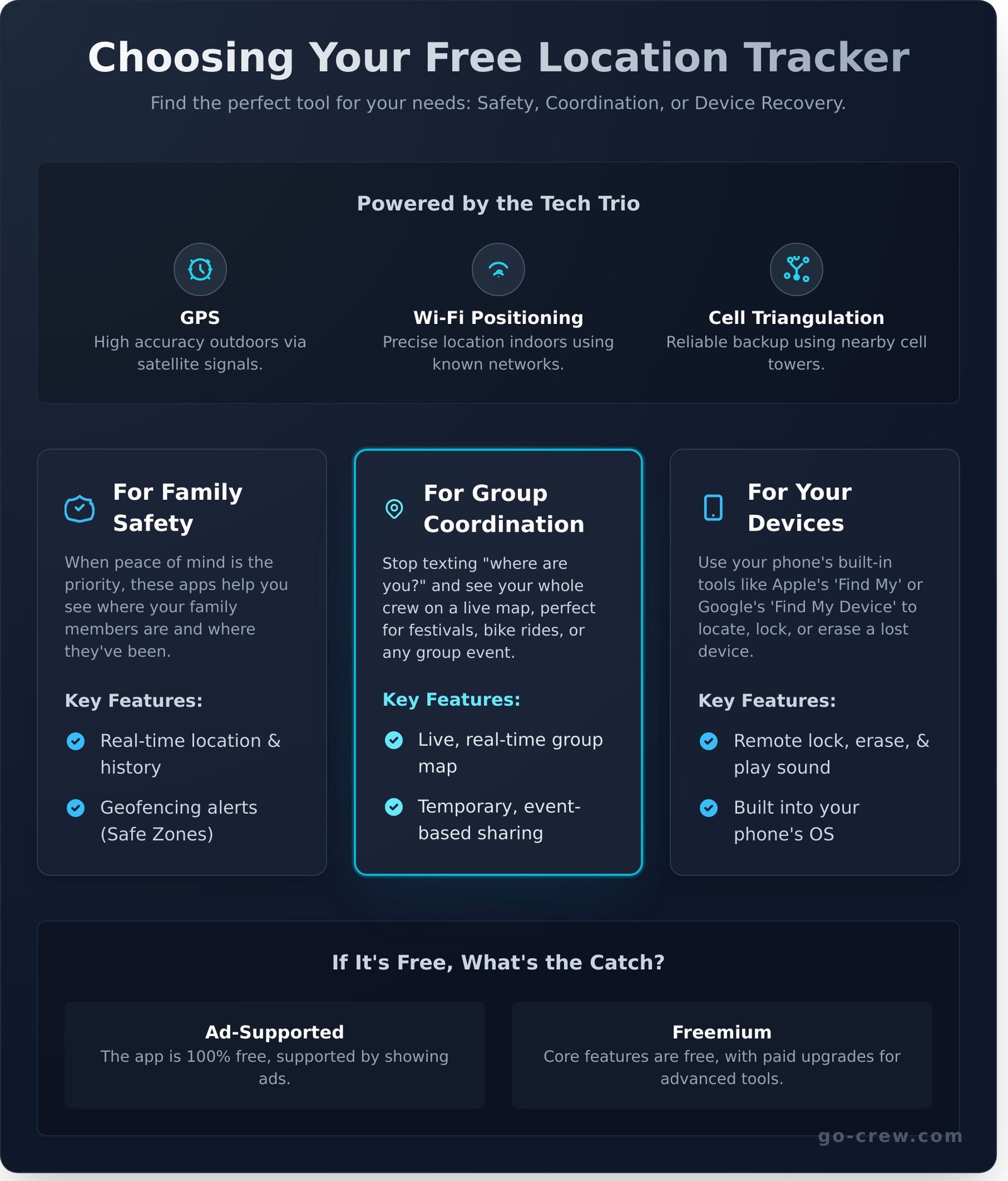
- GPS (Global Positioning System): This is the MVP for outdoor tracking. It connects to satellites orbiting Earth to calculate your precise location, often within a few meters. The core of this system is the GPS tracking unit inside your device, which receives these signals. The only downside? It needs a clear view of the sky to work well.
- Wi-Fi Positioning: When you’re indoors or in a dense city, GPS can struggle. That’s where Wi-Fi steps in. Your phone scans for nearby Wi-Fi networks and uses a massive database of their known locations to figure out where you are. It’s surprisingly accurate.
- Cell Tower Triangulation: This is the reliable backup plan. By measuring the signal strength from multiple nearby cell towers, your phone can estimate its position. It’s less accurate than GPS or Wi-Fi but works almost anywhere you have a cell signal.
Built-in Services vs. Third-Party Apps
You have two main options for location tracking. Apple’s ‘Find My’ and Google’s ‘Find My Device’ are built right into your phone’s operating system. They are perfect for finding a lost device or getting a quick location update on a family member. They are simple, secure, and ready to go.
Third-party apps, however, are built for more. They often offer advanced features like creating groups for a festival or bike ride, viewing detailed location history, or setting up custom alerts. If you need real-time, dynamic group tracking, a dedicated app is your best bet.
If It’s Free, What’s the Catch?
It’s a fair question. How can a powerful free location tracker cost nothing? The answer usually lies in one of two business models, neither of which involves selling your personal location data (for reputable apps, at least).
- Ad-Supported: The app is completely free to use, but it displays advertisements to generate revenue. This is a common model that keeps the core service accessible to everyone.
- Freemium: The basic features are free, but you can pay to unlock premium options. This might include an ad-free experience, unlimited location history, or more advanced tracking tools.
Choosing the Right Type of Free Tracker for Your Needs
Not all location trackers are created equal. The best free location tracker for you depends entirely on your goal-what job do you need it to do? Whether you’re ensuring a loved one is safe, coordinating a group meetup, or finding a lost phone, the right tool makes all the difference. These apps all rely on the Global Positioning System (GPS), a remarkable network of satellites that makes real-time tracking possible. If you’re curious about the technology, NASA provides a clear explanation of How GPS Works. Let’s break down the main categories to help you decide.
For Family Safety: Keeping an Eye on Loved Ones
When peace of mind is the priority, you need features designed for safety. These apps focus on real-time location sharing and location history, so you can see where your family members are and where they’ve been. A key feature is geofencing, which lets you set up virtual boundaries around places like home or school. You’ll get automatic alerts when a loved one arrives or leaves a “safe zone.” Remember, these tools are most effective when used with consent and open communication within the family.
For Group Coordination: Meeting Up with Friends & Crews
Ever tried to find your friends at a crowded festival or keep a cycling group together on the road? This is where group-focused trackers shine. Instead of constant “where are you?” texts, these apps provide a live map of everyone in your crew. The focus is on temporary, real-time sharing for a specific event or activity. This is the core philosophy behind apps like Go Crew, designed for fast-moving groups who demand simplicity and time-saving coordination without interruptions.
For Your Devices: Finding a Lost Phone or Tablet
Misplacing your phone or tablet can be stressful, but built-in tools can save the day. Both Apple and Google offer robust, free solutions integrated into their operating systems.
- Apple’s ‘Find My’: For iPhones, iPads, and MacBooks, this app lets you see your device on a map, play a sound to locate it nearby, or mark it as lost to lock it down.
- Google’s ‘Find My Device’: For Android users, this service offers similar powerful features.
For security, both platforms allow you to remotely lock your device with a message or completely erase its data to protect your personal information if it’s stolen.
Essential Features to Compare in Free Location Tracking Apps
Not all tracking apps are created equal. Seeing a dot on a map is the bare minimum. A truly useful free location tracker delivers speed, reliability, and control without draining your battery or compromising your privacy. To find the right fit, you need to look beyond the download button and compare the core features that matter.
Use this quick checklist to evaluate any app you’re considering:
- Real-Time Accuracy: How fast and precise are the updates?
- Battery Efficiency: Will it kill your phone’s battery in an hour?
- Privacy & Security: Who sees your data and how is it protected?
- Location History: Can you review past routes and locations?
- Geofencing (Alert Zones): Does it notify you when someone enters or leaves a specific area?
Accuracy and Real-Time Updates
‘Real-time’ should mean exactly that-updates every few seconds, not every few minutes. This is critical for activities like group rides or meeting up at a festival. Keep in mind that accuracy can depend on your environment; a clear sky gives a better GPS signal than a dense city or being indoors. Some free apps intentionally delay updates to conserve battery, so check what the app promises before you commit.
Battery Consumption: Finding an Efficient App
Let’s be direct: constant GPS use is a major battery drain. The best apps combat this with smart technology. Look for features like ‘adaptive tracking,’ which uses less power when you’re stationary and ramps up when you’re on the move. This efficiency is key. Your best bet is to always check recent app store reviews for real-world feedback on battery consumption before you download.
Privacy Controls and Data Security
This is non-negotiable. Before you install any app, scrutinize the permissions it requests. A location tracker has no business accessing your personal contacts or photos. A trustworthy app will have a clear, easy-to-read privacy policy and use security measures like end-to-end encryption. It’s crucial to understand what information is being collected, a concern detailed in a comprehensive Consumer Action report on location tracking that exposes how some services handle user data. If the developer isn’t transparent, move on.
The Hidden ‘Costs’: What to Watch Out For with Free Trackers
Free is a powerful word, but in the tech world, it often comes with a trade-off. A free location tracker can be an incredible tool, but it’s crucial to understand the hidden ‘costs’ to avoid a bad experience. Think of this as your smart user’s guide to navigating the free app landscape without getting burned.
The goal isn’t to scare you away from free options but to equip you with the knowledge to choose the right one. Here’s what’s really going on behind the download button.
The Freemium Model: Limited Features and Upsells
Most top-tier apps operate on a freemium model. This means the core location sharing is free, but the powerful, quality-of-life features are locked behind a subscription. Before you commit, identify your non-negotiables. Do you just need to see a friend’s real-time location, or do you need more?
Common paid upgrades include:
- Unlimited Location History: See where someone has been over days or weeks.
- More Geofences: Set up multiple ‘safe zones’ or ‘no-go areas’ with alerts.
- Advanced Alerts: Get notifications for things like low battery or high speed.
- Ad-Free Experience: A clean, uninterrupted interface.
Data Privacy: When You Are the Product
This is the most critical factor. Some developers offer a completely free location tracker because they make money by collecting and selling your (and your friends’) location data to advertisers and data brokers. Your movements become a commodity.
Red Flag: A vague or non-existent privacy policy. If an app doesn’t clearly state what it does with your data in simple terms, steer clear. Prioritize services that are transparent about their business model. Companies built for specific communities, like Go-Crew for group events and motorsports, often focus on providing a great service rather than monetizing user data.
Intrusive Ads and Poor User Experience
Ads are the most common way free apps pay the bills. A simple banner ad at the bottom of the screen is one thing, but many apps go too far. Watch out for full-screen video ads that interrupt you when you’re trying to check a location or pop-ups that are difficult to close. A clunky, ad-filled interface can make an app unusable, especially in a hurry. Sometimes, a small subscription is worth the price for a fast, clean, and reliable experience.
Go Crew: The Simple, Free Tracker for Group Activities
While many apps track a single person, what happens when you need to coordinate an entire group in motion? The endless “Where are you?” texts, the missed turns, the friends left behind-it’s a coordination nightmare. This is where most trackers fail and where Go Crew excels. It’s built specifically for the dynamic, real-time needs of a group on the move.
Built for the Crew, Not Just the Individual
Go Crew was designed from the ground up for group dynamics. Think motorcycle convoys, cycling clubs, road trip caravans, or friends meeting at a festival. It’s not a family safety app for passive monitoring; it’s an active coordination tool. The key difference? You can see everyone’s live speed and heading on a single, uncluttered map. This allows the group leader to manage pace and ensure no one gets left behind. It’s about the shared experience, in real-time.
What You Get for Free, No Strings Attached
Go Crew delivers on its promise of simplicity, and that includes its pricing. It’s a powerful free location tracker that gives you everything you need without a paywall. The core features are always free for everyone in your group.
- Unlimited Crew Members: Whether it’s you and a friend or a club of 50, there are no limits.
- Real-Time Tracking: See your group move on the map with minimal delay. Fast, fluid, and reliable.
- Easy Setup: No complex sign-ups or linking personal accounts. Just download and go.
The app is supported by a simple, ad-supported model, ensuring the essential group tracking tools remain accessible to all, without any hidden costs or feature restrictions.
Get Your Group on the Map in Under a Minute
Forget complicated setups. Go Crew embodies its core values of TIME-SAVING & SIMPLICITY. Getting your group connected is a fast, three-step process: Download the app, create a new ‘Crew’ with one tap, and share the unique, temporary code with your friends. They enter the code, and instantly, everyone appears on the map. Group location sharing couldn’t be easier than this.
Stop wasting time and start enjoying the journey together. Download Go Crew for free and try it with your friends today!
Find Your Crew, Not Complications: The Right Tracker Awaits
You’ve seen how location trackers work, what features to look for, and the hidden costs to avoid. The key takeaway is simple: the best free location tracker isn’t just about finding a dot on a map; it’s about seamless connection and peace of mind without compromising your privacy or wasting your time on complex setups. Choosing the right tool means matching its purpose to your needs, especially when coordinating with a group.
Forget the trackers bogged down by ads and unnecessary features. For dynamic group activities, you need a tool built for speed and clarity. Go Crew was designed with one core mission: TIME-SAVING & SIMPLICITY. It delivers powerful, real-time tracking for your whole group, making it the perfect companion for motorsports events, cycling adventures, and packed festivals where staying connected is everything. Group location sharing couldn’t be easier.
Stop wondering where everyone is and start enjoying the moment together. Your next adventure is waiting, and keeping your crew in sight has never been easier. Ready to track your crew? Download Go Crew for free!
Frequently Asked Questions
Can I track someone by their phone number for free?
While many online services claim to track a phone by its number alone, these are often unreliable or scams. The most effective and legitimate method is using a location-sharing app that the other person has installed and consented to use. Apps like Google Maps or Find My (on iPhone) allow users to voluntarily share their real-time location with you. This consent-based approach is secure, accurate, and respects everyone’s privacy.
Do free location trackers work without an internet connection?
For live, real-time tracking, an internet connection (Wi-Fi or mobile data) is essential. It’s needed to send the phone’s location data from their device to yours. While the phone’s GPS chip can determine its coordinates without the internet, it cannot share that information live. Some apps may log location points offline and sync them later, but you won’t be able to see movement on a map as it happens without a connection.
Is it legal to use a free location tracker on someone’s phone?
It is only legal to track an adult with their explicit and informed consent. Installing a tracking app on someone’s phone without their permission is a serious invasion of privacy and is illegal in most jurisdictions. The primary exceptions are for parents tracking their own minor children or for locating your own lost or stolen device. Always prioritize transparency and get permission before tracking anyone to ensure you are acting legally and ethically.
How accurate are the locations shown by free tracking apps?
The accuracy of modern free tracking apps is generally very high, often pinpointing a location within 5-15 meters. This precision relies on a combination of technologies. GPS provides the most accurate data outdoors, while indoors or in dense urban areas, apps use Wi-Fi signals and cell tower triangulation to maintain a strong fix. While factors like tall buildings can cause slight delays, the accuracy is more than sufficient for everyday uses.
What is the best free location tracker for Android?
For most Android users, Google’s native tools are the top choice. Google Maps provides excellent real-time location sharing for coordinating with friends and family. For security, Google’s “Find My Device” is essential for locating a lost or stolen phone, allowing you to ring, lock, or erase it remotely. Both are seamlessly integrated into the operating system, completely free, and highly reliable for all your tracking needs.
What is the best free location tracker for iPhone?
The best free location tracker for iPhone users is Apple’s built-in “Find My” application. It powerfully combines “Find My Friends” and “Find My iPhone” into a single, user-friendly interface. You can use it to share your live location with contacts, track all your Apple devices (including AirPods and MacBooks), and even find items attached to an AirTag. It’s secure, efficient, and perfectly integrated into the Apple ecosystem.
Do location tracking apps drain your battery quickly?
While any app running in the background uses some power, modern location trackers are highly optimized to minimize battery drain. They use a smart combination of GPS, Wi-Fi, and cell signals, choosing the most energy-efficient method to determine location. Continuous, high-frequency updates will use more battery than periodic checks, but for typical use, the impact on your daily battery life is often minimal and has been greatly improved in recent years.
